✦ AI EFFECTS
GTA 6 PC PLAYERS AI VIDEO GENERATOR
Add two photos and get the GTA 6 PC Players clip, both of you lunging at the camera for 11 seconds in 9:16. No prompt, sound kept.
TWO PHOTOS, TWO PEOPLEONE CUT, 11 SECONDS9:16, SOUND KEPTUSUALLY 5 TO 15 MINUTES
TEMPLATE
Your video carries this template's own sound.
YOUR PHOTOS
Two different people, one clear front-facing photo each. The first photo is the man in the dark cap, the second is the woman with no cap who lunges at the lens. Each face stays with its own person for all 11 seconds even though the two keep crossing sides, and the outfits, the yard and the line of caption along the bottom come from the template.
ASPECT RATIO
Your video lands here
Fill both slots, tick the box, press generate. One run renders the two of you together.
- WHAT YOU ADD
- Two photos, two different people
- WHAT CHANGES
- Both faces, and nothing else
- WHAT COMES BACK
- An 11s 9:16 video, sound kept
- WHAT IT COSTS
- 700 credits
- HOW LONG IT TAKES
- Usually 5 to 15 minutes
- IF IT FAILS
- Credits come back, on our side
UP-FRONT PRICING
Recommended packs start at $9.99 and stay valid while your account is active. Memberships start at $4.99 a month. One balance covers every image and video tool. Two photos, one render, a flat 700 credits.
Standard Pack
$9.99
700CREDITS
≈ 350images
≈ 30SOTA images
≈ 88svideo
≈ 43sSOTA video
A full issue's worth of art, plus videos for the launch.
ONE PAYMENT · NEVER EXPIRE
Pro Pack
$19.99
1,600CREDITS
≈ 800images
≈ 69SOTA images
≈ 208svideo
≈ 100sSOTA video
Batch season. Whole chapters and the videos that sell them.
ONE PAYMENT · NEVER EXPIRE
STANDARD MEMBERSHIP
$4.99/ month
1,000CREDITS EVERY MONTH
For weekly creators and side projects.
≈ 500images
≈ 43SOTA images
≈ 128svideo
≈ 62sSOTA video
NO LOCK-IN · CANCEL ANY TIME
PRO MEMBERSHIP
$19.99/ month
5,000CREDITS EVERY MONTH
For daily image and video production.
≈ 2,500images
≈ 217SOTA images
≈ 664svideo
≈ 312sSOTA video
NO LOCK-IN · CANCEL ANY TIME
Membership credits are available while the membership is active. Unused membership credits expire when the membership ends.
Image estimates use Flux 3 Klein at 1K, the lowest-priced run on the site. Video estimates use 8-second Veo 3.1 Lite videos at 720p, or Wan 3.0 at 480p for the SOTA row. The console shows the exact cost before every run.
GTA 6 PC Players
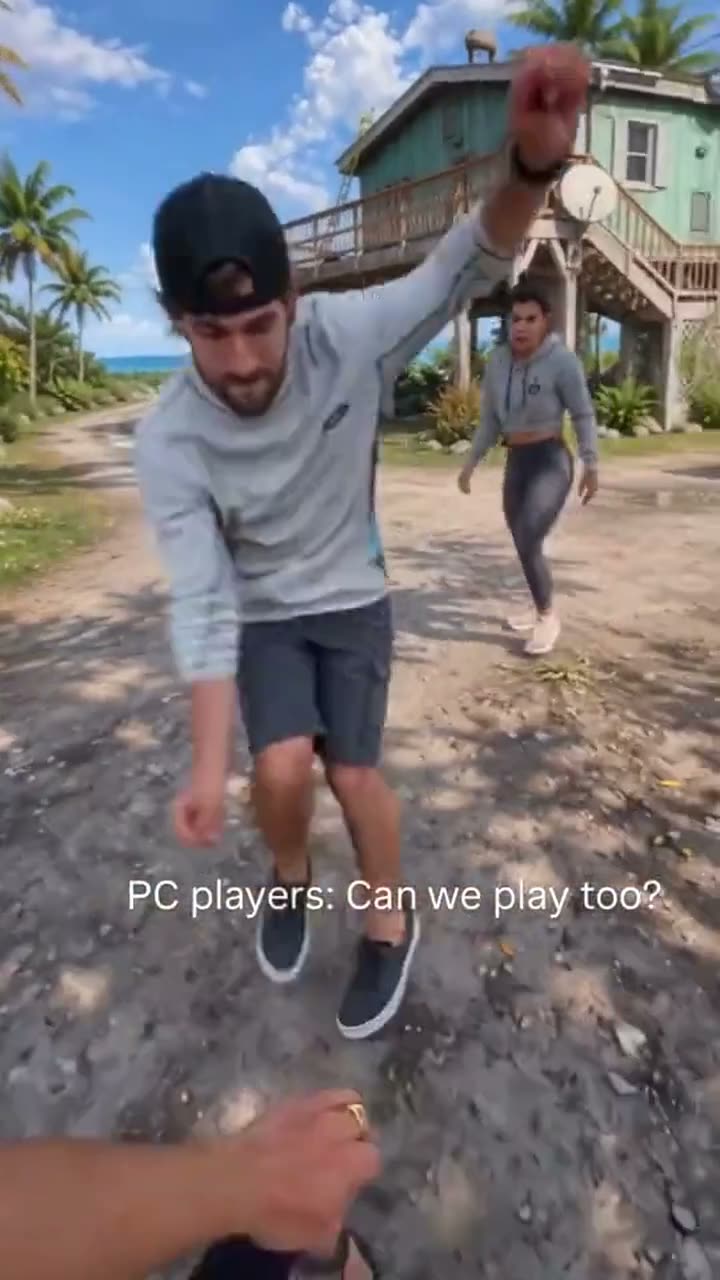
PC players have been waiting on a console release coming to desktop, and the joke they made out of the wait is a plea performed too aggressively: a man and a woman in a sunny dirt yard, strafing side to side, dipping low, then charging the camera, while a line of caption burned along the bottom of every frame asks to be let in. The premise underneath it is that the new title reaches consoles first and the computer version is not in that window, so the ask is shouting at a locked door. It is a two person bit, which is why this template has two photo slots. Can We Play Too keeps the yard, the raised green house with its dish antenna, the palms, the old teal car, the handheld sway and the caption, and swaps only the two faces.
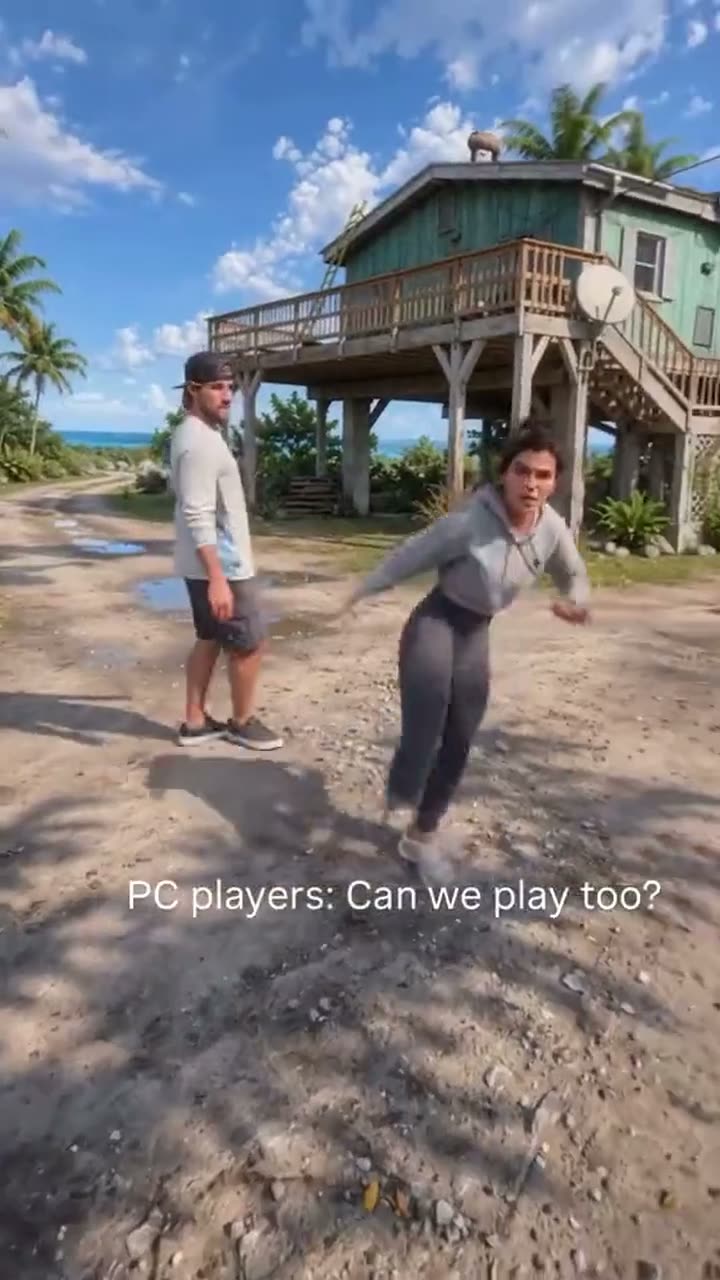 01
Strafe And Dip
At the first half second the pair is already at it: the man in the dark cap planted at the left, the woman at the right mid stride, knees bent, shuffling across the sand in front of the stilt house.
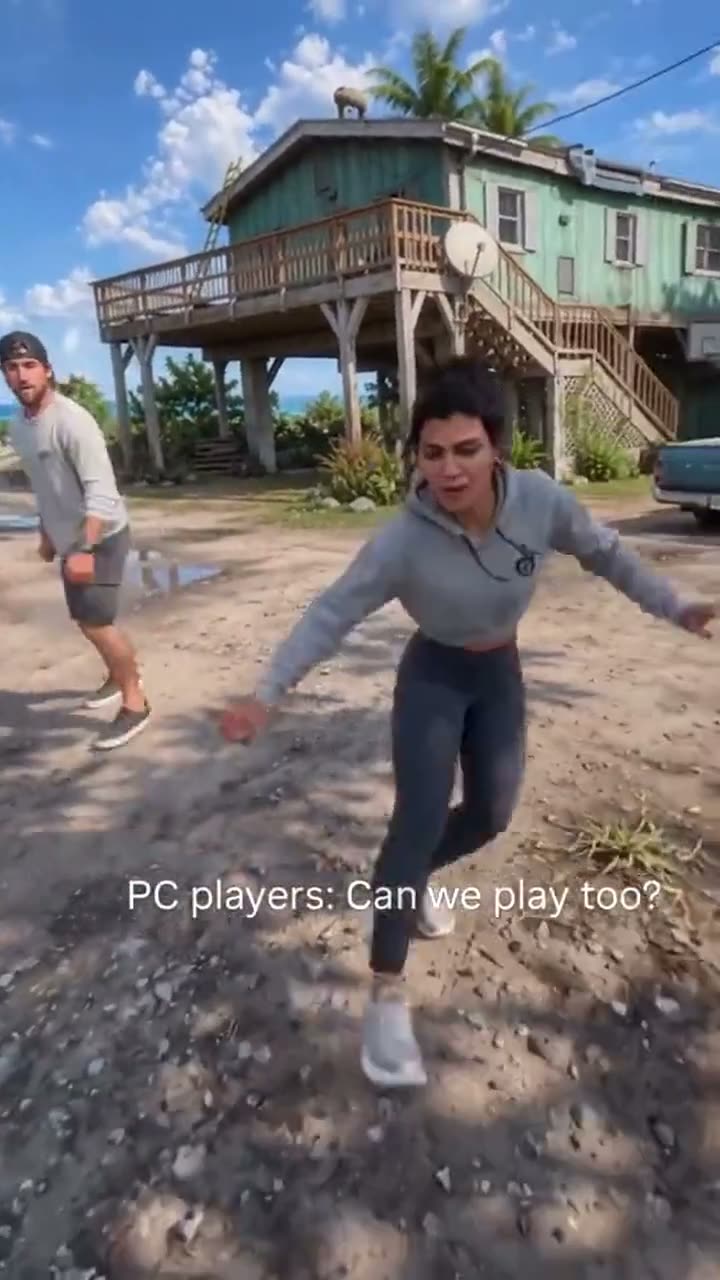 02
The One With No Cap Lunges
Near 3.85 seconds the woman with no cap comes straight at the lens with both arms out, while the capped one stays low behind her at the left.
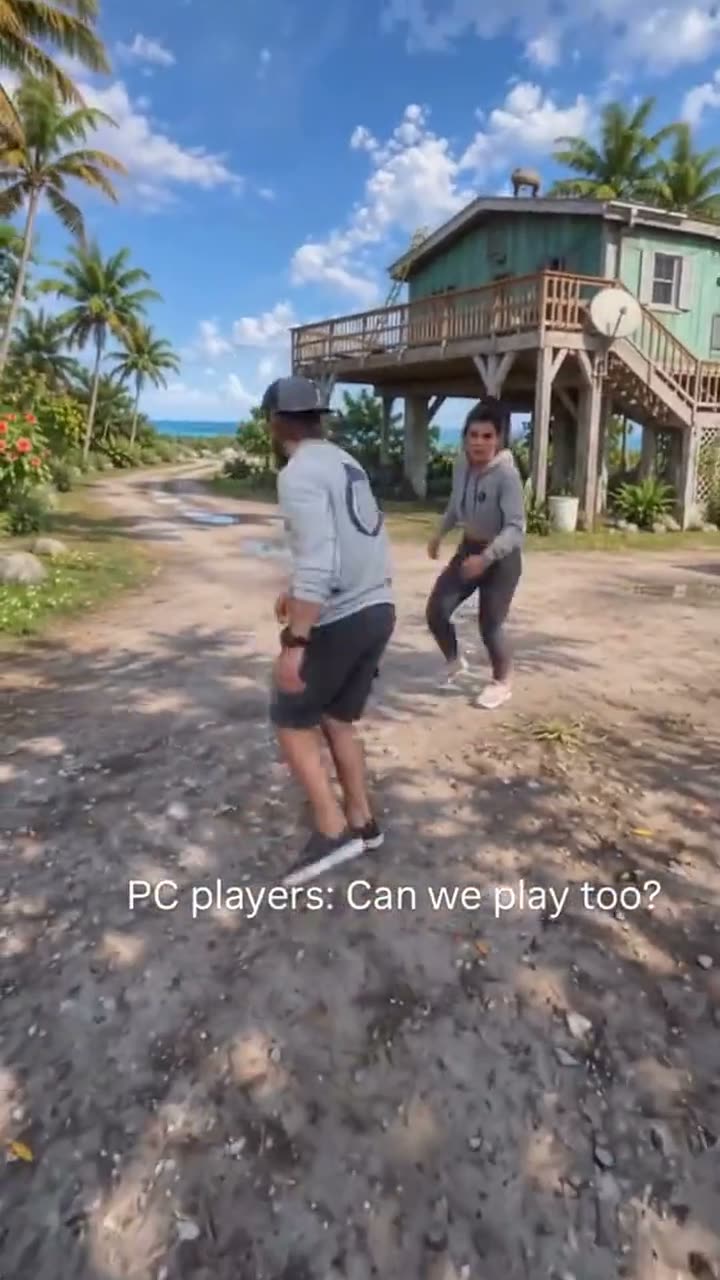 03
The Two Cross Sides
Around 6.6 seconds the pair has swapped halves of the frame: the man in the cap is now the close one, weight low and turning, while the woman drops into a crouch behind him and comes back up.
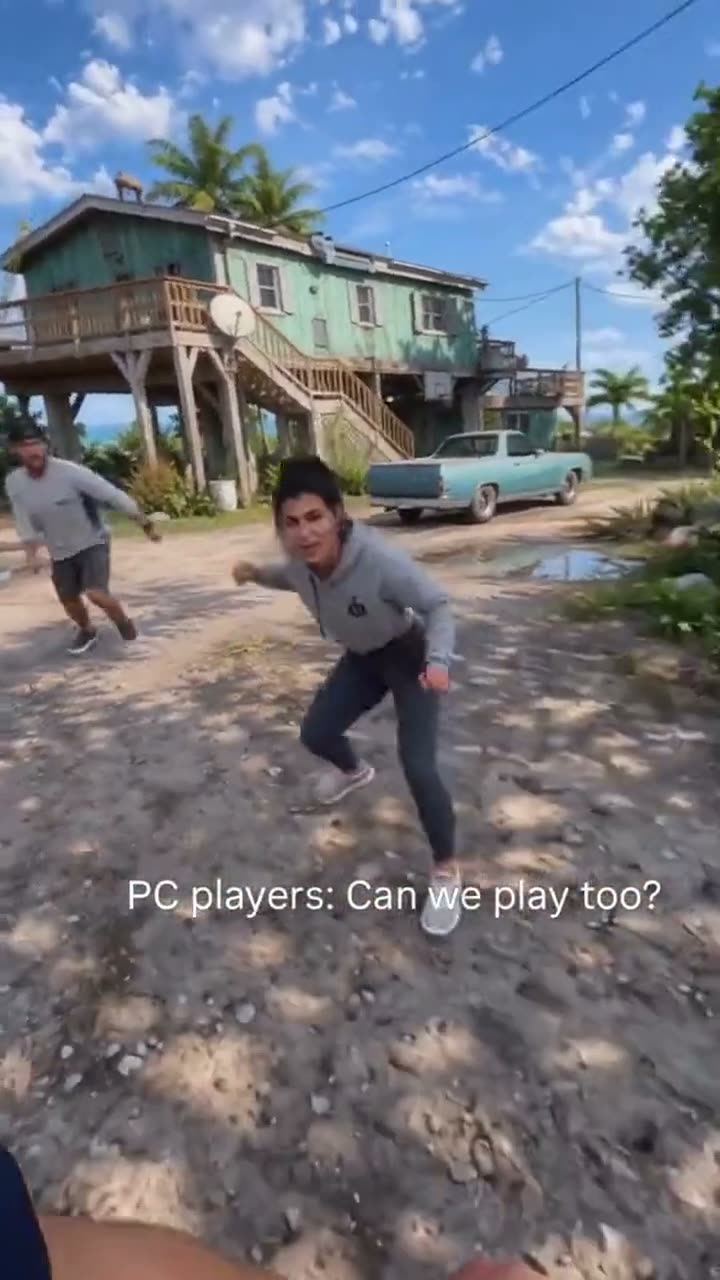 04
The Holder's Hand
By 9.35 seconds the woman is in the camera's face again, the teal car sits at the right of the yard, and the holder's own hand is up at the bottom edge of the frame, which is where the clip finishes.
One take, two faces
Everything below comes straight from the template, so the yard, the single handheld take and the timing are what you get back. Can We Play Too is 11 seconds of 9:16 with two people in it, so your first photo becomes the man in the dark cap and your second becomes the woman with no cap. 700 credits renders both of them at once.
Three steps, no prompt
- CAN WE PLAY TOO · 11S · 9:16 · 2 PHOTOS
RATIO9:16QUALITY480POpen the console
One cut here: Can We Play Too, 11 seconds, 9:16 at 480p, two photo slots and a flat 700 credits. There is nothing to configure and no ratio to choose.
✓you.jpg
✓your-friend.jpg
✓I own these photos or have permission to edit them
Add two photos
One photo per person, and they have to be two different files. The first slot is the man in the dark cap, the second is the woman with no cap who lunges at the lens. Both faces clear, front-facing, most of the body visible, since the bit is footwork and full body leaps.
pc-players-can-we-play-too.mp4✓ 11S · 9:16 · SOUND KEPT
Render it
Confirm the photo permission box, read the credit figure the console quotes, then generate. The clip comes back at 11 seconds in 9:16 with the template's own yard noise and the spoken line, usually inside 15 minutes.
What makes a clean swap
- 01Two photos means two people. The console rejects the same file in both slots, and it will not turn one face into a doubled version of itself.
- 02Sort the slots by the cap, not by position. The two cross halves of the frame constantly during the take, so the person you put in slot one is the capped figure the whole 11 seconds, wherever they end up standing.
- 03Shoot far enough back to see head to knees. The bit is a leap, a crouch and a lunge, and a chest-up crop leaves the model nothing to move.
- 04Both outfits belong to the template: gray long sleeves and dark shorts on the man in the cap, gray hoodie, dark leggings and white shoes on the woman. Nothing you upload changes the clothes, the house or the teal car.
- 05Get a yes from both people before uploading. This is a face shoved into a camera in an argument shaped like a joke, and one of the two is going to be the one getting pushed off.
EVERY TOOL, ONE BALANCE
Sibling trend pages run the same setup: fixed template, photos in, one finished clip out, and the credit cost visible before you commit.
Two faces, one line of caption
GTA 6 PC Players AI is PixQuill's console for the can-we-play-too yard bit: two photos in, one finished trend clip out, no editing app and no prompt writing. It is a fan-made recreation of a meme format and has no affiliation with, sponsorship from or endorsement by any game publisher, studio or account that started the trend. Nothing from the game appears in it: the yard, the house, the car and the people are our own template footage.
Your two photos are the only sources for the two faces, and each stays on its own person. The man in the dark cap is bound to your first photo and the woman with no cap to your second, and because the two swap sides of the frame throughout the take, the binding follows the person rather than the half of the screen. Neither face blends into the other, trades hair or skin tone, or gets dropped on the hardest frames.
A line of lettering already sits burned along the bottom of every frame of the template, and it is part of the format, so it stays exactly as it is: same wording, same position, same timing. PixQuill adds nothing on top of it, no logo, no caption, no watermark, and pulls nothing from your photos into the background. The camera holder's hand at the bottom edge in the last second belongs to the template too.
Nothing installs on your device and nothing here depends on your browser staying open: both photos go to a video model on our servers, the render finishes after you close the tab, and clips stay downloadable from your account while your account is active. If a render fails on our side, the credits land back on your balance.
Before you render
▸ Do I have to write a prompt?
No. The template's prompt is written and locked on our side. You drop in two photos and press generate.
▸ What is the GTA 6 PC Players meme?
The joke PC players made out of waiting for a console title to reach desktop: a plea delivered as an assault. A man and a woman work a sandy yard, strafing, crouching and lunging into a handheld camera while a line of caption sits along the bottom of the frame asking to be let in too. It leans on the same gap every search about a gta 6 pc release is poking at, since the new game is a console-first thing and the computer version is not part of that window. Fan editors started putting their own faces, and their friends, onto the pair. This page rebuilds that take from two photos.
▸ Why does this one need two photos?
Because the format is a pair, and each figure gets a source. Slot one is the man in the dark cap, slot two is the woman with no cap who lunges at the lens. The console needs two different files, and it refuses the same photo twice. If you only have one face to work with, GTA Wanted Poster runs on a single photo.
▸ Do the two faces switch when the two cross sides?
No, and that is the part the template is strict about. Each photo is bound to a person rather than to a half of the frame, so the capped figure stays the same face on the left, on the right and mid-leap. Nothing averages out or trades features between them.
▸ What happens to the text at the bottom of the frame?
It stays. That line of lettering is already burned into the template, frame for frame, and the prompt keeps its wording, position and timing untouched. The site does not rewrite it, translate it, move it or add anything over it.
▸ Does the video have a watermark?
Nothing is stamped on your result: no site logo, no added subtitle, no handle from your photo. The only lettering in the frame is the line the template already carried.
▸ What does it cost?
700 credits for the whole 11 second take, both faces included, quoted in the console before anything is charged. New accounts get free credits to start, and packs sit on pricing.
▸ How long does rendering take?
Usually 5 to 15 minutes. The render keeps going on our side, so you can leave the page and pick the clip up from your account history.
▸ Can I use a pet photo?
Not here. Both slots are people, and the take is built on footwork, a leap and a lunge that a pet photo will not carry. For an animal in the frame, GTA Cat On The Bus and Dog Playing GTA 6 are built around a pet or a person, one photo.
▸ Does this use anything from the game itself?
No. It is a fan-made recreation of a meme clip, using no game assets, footage or characters, with no affiliation to, sponsorship from or endorsement by any game publisher.
▸ Can I post it commercially?
See the terms and privacy notice for what you can do with renders and what happens to the photos you upload.
Let the PC players in
Two photos, one fixed take, 11 seconds of the two of you working a handheld camera in that yard. Free credits on signup, and the console names the price before you press generate.