✦ BG REMOVER · FREE TO TRY
FREE AI BACKGROUND REMOVER, NO WATERMARK
Sign up, get free credits, and cut real images before you pay anything. Results download clean: no stamps, no trial versions.


SOURCE PHOTO
Drop a photo here, or click to browse
PNG / JPG, up to 5 MB
Your result lands here
Upload a photo, then hit generate.
- FREE CREDITS ON EVERY NEW ACCOUNT
- START
- DAILY CHECK-IN ADDS MORE
- TOP UP
- FULL ENGINE, NOT A TRIAL MODE
- CUT
- NO WATERMARK ON ANY DOWNLOAD
- KEEP
UP-FRONT PRICING
Packs start at $1.99 and stay valid while your account is active. Memberships start at $4.99 a month. One balance covers every image and video tool. The console prices every run before you commit.
Starter Pack
$1.99
100CREDITS
≈ 50images
≈ 4SOTA images
≈ 8svideo
≈ 6sSOTA video
A quick test run.
ONE PAYMENT · NEVER EXPIRE
Standard Pack
$9.99
700CREDITS
≈ 350images
≈ 30SOTA images
≈ 88svideo
≈ 43sSOTA video
A full issue's worth of art, plus videos for the launch.
ONE PAYMENT · NEVER EXPIRE
Pro Pack
$19.99
1,600CREDITS
≈ 800images
≈ 69SOTA images
≈ 208svideo
≈ 100sSOTA video
Batch season. Whole chapters and the videos that sell them.
ONE PAYMENT · NEVER EXPIRE
STANDARD MEMBERSHIP
$4.99/ month
1,000CREDITS EVERY MONTH
For weekly creators and side projects.
≈ 500images
≈ 43SOTA images
≈ 128svideo
≈ 62sSOTA video
NO LOCK-IN · CANCEL ANY TIME
Membership credits are available while the membership is active. Unused membership credits expire when the membership ends.
Image estimates use Flux 3 Klein at 1K, the lowest-priced run on the site. Video estimates use 8-second Veo 3.1 Lite videos at 720p, or Wan 3.0 at 480p for the SOTA row. The console shows the exact cost before every run.
CUTS FROM FREE CREDITS
These are full-quality results, not trial previews. Slide each pair and look at the edges.
Wind-blown hair against a hazy sky, cut on the free credits that come with a new account. Nothing on the download but the subject.


Stray hair against a busy mountain backdrop is where most removers melt. Here the boundary is re-rendered before the cut, so the strands survive.
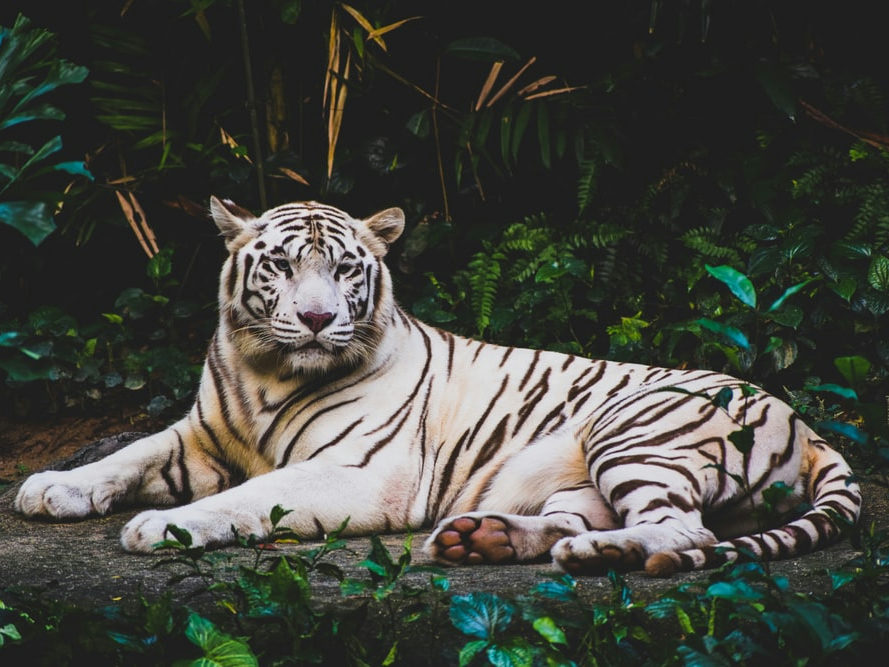
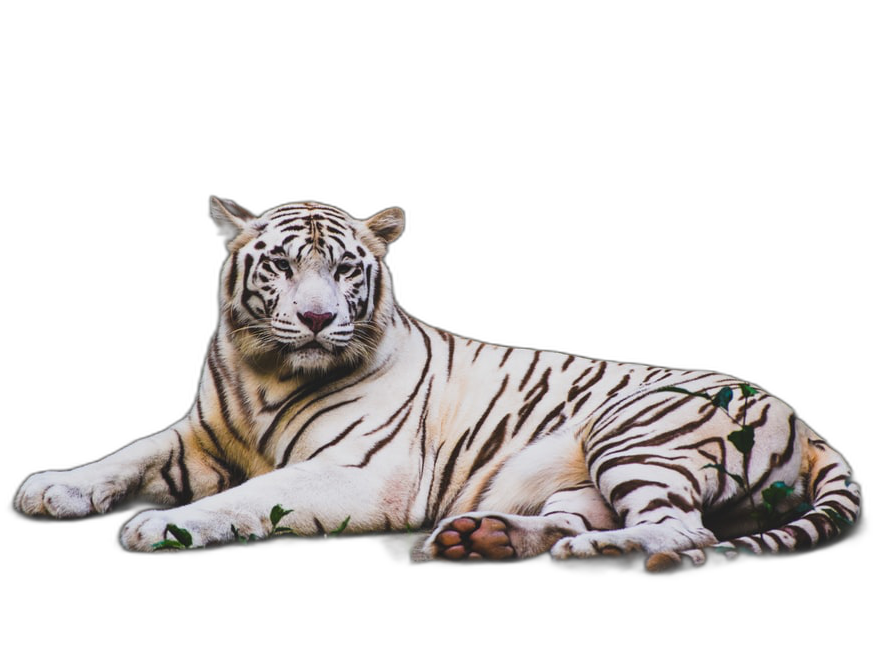
White fur on dense jungle foliage is the worst case for auto picks. The fur stays fur and every leaf behind it goes transparent.
WHAT THE FREE CREDITS COVER
TRY BEFORE YOU COMMIT
Cut two or three real images on signup credits and judge the edges before any payment.
ONE-OFF JOBS
One cutout for a birthday card or a single listing fits inside the free signup credits.
CLASSROOM AND CLUB USE
Students and club members can each run their own images on their own free balances.
WEEKEND PROJECTS
Daily check-in credits add up across a project week without touching the wallet.
EVALUATING HARD CASES
Fur, hair, glassware: test the hard one free. If the edge holds, the easy ones will too.
SIZING UP THE WORKFLOW
Run a real batch at small scale on credits before deciding how many paid credits a month needs.
A CUTOUT ENGINE, NOT A REDRAW.
Lots of free removers hand you a blurred preview and charge for the real file. Here the free credits run the same engine paid credits do.
THE WHITE-BACKDROP APPROACH
- Advertises free, then stamps the download or caps the size
- Repaints the subject on white and erases the plate after
- Detail gets re-invented at whatever the trial resolution is
- The free tier is also the slow tier, and the queue shows it
THE DEDICATED CUTOUT ENGINE
- Free credits run the same engine paid credits run
- Segments the subject and returns native alpha every time
- Your own resolution comes back, up to 4K, on a free run too
- The cost shows before the button, so nothing is a surprise
EVERY TOOL, ONE BALANCE
Background removal is usually one step of the job. Every other tool shares your uploads and credits.
UPLOAD, CUT, DOWNLOAD
DROP A PHOTO HERE, OR CLICK TO BROWSE
PNG / JPG · UP TO 5 MB
UPLOAD THE PHOTO
Any JPG or PNG up to 5 MB, long edge 4096 px or less. One photo is the whole input.
THE ENGINE FINDS THE SUBJECT
THE ENGINE CUTS
The engine segments the subject and returns transparent PNG at the photo's resolution. Free or paid, same engine.
cutout.png✓ PNG · TRANSPARENT
DOWNLOAD THE PNG
About 5 to 20 seconds later you have a transparent PNG at the same resolution as your upload, up to 4K.
CUTOUTS THAT SHIP
THE FULL ENGINE
Free runs use the same cutout engine and the same resolution handling as paid runs. No downgraded trial mode.
NO CARD TO START
Sign up, take the free credits and run real images. Nothing is charged until you buy a pack yourself.
NOT A SAMPLE FILE
A free run produces the same transparent PNG at your own resolution, up to 4096 px. There is no smaller preview version held back.
COST ON SCREEN
The console shows the exact credit price before each run, and a failure caused by our side returns those credits automatically.
NO WATERMARK, EVER
Results download clean. Nothing gets stamped on your image, free credits or paid.
HONEST BILLING
The price shows before the run, and failures on our side refund automatically.
SHARPER CUTOUTS
- 01Read the credit line under the button before you run. It shows the same number whether the balance is free or bought.
- 02Daily check-in credits stack across a week, so a short project often finishes without a purchase at all.
- 03Keep files under 5 MB. A high-quality JPG usually fits even at 4K.
- 04The checkerboard preview is your friend: gray squares mean real transparency.
- 05Test your hardest image first. If the fur or hair edge holds, everything else is easy.
- 06Check in daily across a project week; the top-ups cover most small batches.
FREE TO TRY MEANS FREE TO JUDGE
The free tier of most background removers is a demo: small previews, watermarks, or a weaker model. PixQuill's free credits work differently. They run the identical cutout engine, at the same resolution as paid runs, so what you judge on signup credits is what a paying user gets.
New accounts start with free credits, and the daily check-in adds more while your account is active. That covers your first cutout outright, and testing the hard cases, fur, flyaway hair, glassware, costs nothing but a few minutes.
When you do start paying, the console shows the exact credit price of every run before it executes, and failures on our side refund automatically. The Image Upscaler and [Object Remover](/object-remover-image) run on the same credits.
STRAIGHT ANSWERS
▸ Is this background remover actually free?
To try, yes. New accounts get free credits and daily check-ins add more, which covers your first cutout. Runs beyond that cost credits each, and the price is always shown before the run starts.
▸ Are the free results watermarked?
No. Every download, free credits or paid, comes back as a clean transparent PNG at your photo's own resolution, up to 4K, with nothing stamped on it.
▸ Do I need a credit card to start?
No. Sign up, get your free credits, and run real images. A card only comes into play if you later choose to buy more credits.
▸ Is the result really transparent?
Yes. What you download is a PNG with a native alpha channel produced by the cutout engine, so the edges composite cleanly onto any color. The checkerboard in the result view shows the transparency directly.
▸ Is it free to try?
Yes. New accounts start with free credits and the daily check-in adds more, so you can run real images before paying anything. The console shows the exact credit cost of every run upfront, and results come with no watermark.
▸ What files can I upload, and at what size?
Any JPG or PNG up to 5 MB, with a long edge of 4096 px or less and a short edge of at least 256 px. The cutout comes back at the same resolution as your upload, up to 4K, usually in 5 to 20 seconds.
▸ Can I use the cutout commercially?
Images you generate are yours to use, including in commercial projects, within our terms. Rights in anything you upload stay where they were, so only process images you own or have permission to use. Details live on the Copyright page.
TAKE THE FREE CREDITS. KEEP THE CLEAN FILES.
Sign up, cut your first image on us, and download it without a watermark. Daily check-ins keep the credits coming.