✦ AI EFFECTS
AI CAT DANCE VIDEO GENERATOR
Add two photos in order, the dancer first, and get a 15 second AI cat dance clip with the sound kept. No prompt.
TWO PHOTOSONE DANCE, ONE PRICEA 15S 9:16 VIDEOUSUALLY 5 TO 15 MINUTES
TEMPLATE
Your video carries this template's own sound.
YOUR PHOTOS
Two photos, one animal each. The first is the one that stands up and dances, the second is the one sitting in front holding the phone. Each animal keeps its own species and coat, so a dog photo gives a dog, and a person photo works in either slot.
ASPECT RATIO
Your video lands here
Load the dancer first, the filmer second, tick and generate.
- WHAT YOU ADD
- Two photos, one dancer and one filmer
- WHAT YOU PICK
- One 15 second hallway dance
- WHAT COMES BACK
- A 15s 9:16 video, sound kept
- WHAT IT COSTS
- 700 credits
- HOW LONG IT TAKES
- Usually 5 to 15 minutes
- IF IT FAILS
- Credits come back, on our side
UP-FRONT PRICING
Recommended packs start at $9.99 and stay valid while your account is active. Memberships start at $4.99 a month. One balance covers every image and video tool. The console shows the fixed price before you render.
Standard Pack
$9.99
700CREDITS
≈ 350images
≈ 30SOTA images
≈ 88svideo
≈ 43sSOTA video
A full issue's worth of art, plus videos for the launch.
ONE PAYMENT · NEVER EXPIRE
Pro Pack
$19.99
1,600CREDITS
≈ 800images
≈ 69SOTA images
≈ 208svideo
≈ 100sSOTA video
Batch season. Whole chapters and the videos that sell them.
ONE PAYMENT · NEVER EXPIRE
STANDARD MEMBERSHIP
$4.99/ month
1,000CREDITS EVERY MONTH
For weekly creators and side projects.
≈ 500images
≈ 43SOTA images
≈ 128svideo
≈ 62sSOTA video
NO LOCK-IN · CANCEL ANY TIME
PRO MEMBERSHIP
$19.99/ month
5,000CREDITS EVERY MONTH
For daily image and video production.
≈ 2,500images
≈ 217SOTA images
≈ 664svideo
≈ 312sSOTA video
NO LOCK-IN · CANCEL ANY TIME
Membership credits are available while the membership is active. Unused membership credits expire when the membership ends.
Image estimates use Flux 3 Klein at 1K, the lowest-priced run on the site. Video estimates use 8-second Veo 3.1 Lite videos at 720p, or Wan 3.0 at 480p for the SOTA row. The console shows the exact cost before every run.
AI Cat Dance
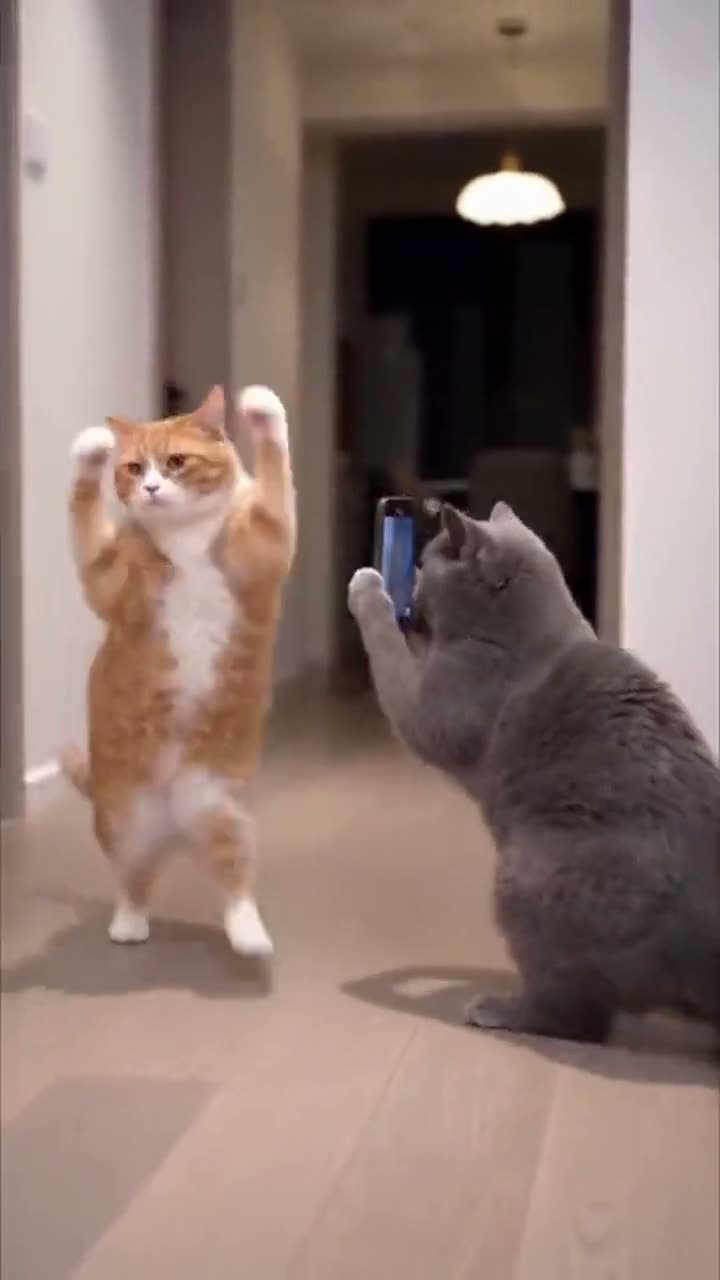
A warm white hallway, wood floor, columns on both sides and a doorway at the far end with a dome lamp burning behind it. One animal is up on its hind legs in the middle of that hall working through a full routine: arms out straight to the sides, paws tucked in front of the chest, both paws up beside the ears, both legs thrown overhead, and it drifts closer to the lens as it goes. The other sits low in the right foreground with a phone held up in both front paws and films the whole thing. The hallway, the phone, the camera and the music all stay where they were. Only who is in the frame changes.
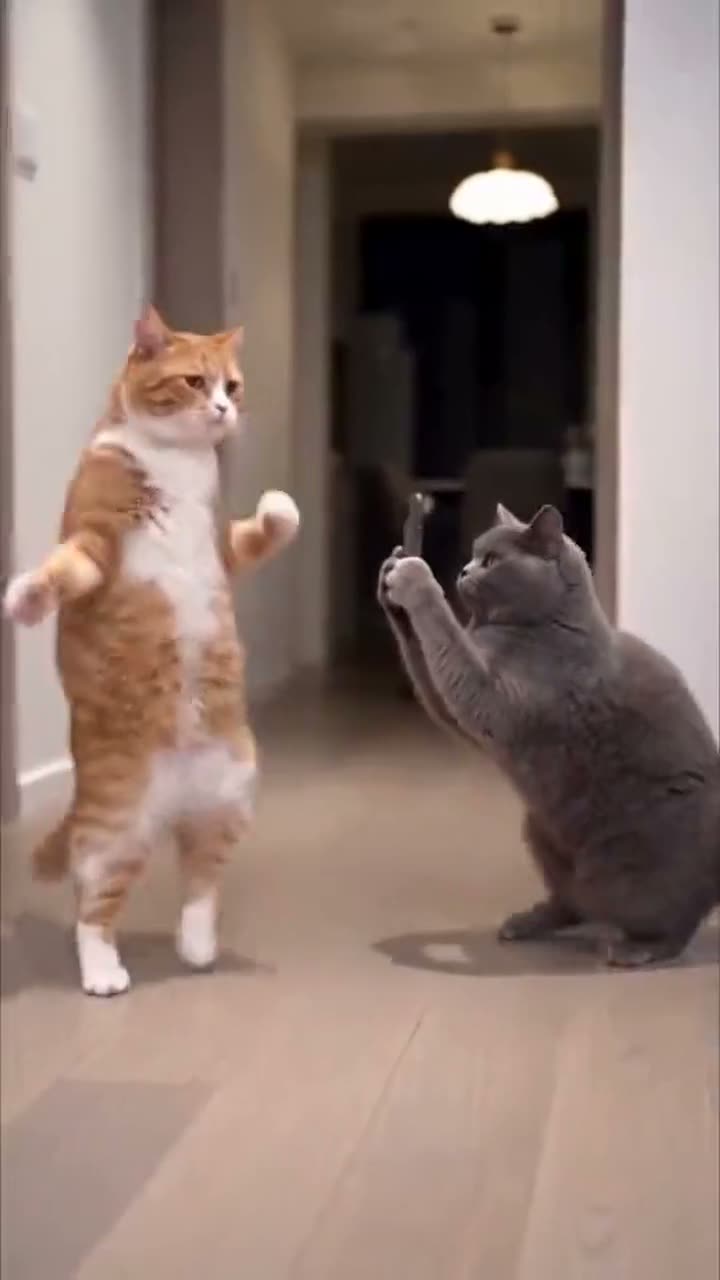 01
Up on two legs
The dancer is already standing upright in the middle of the hall, one paw curled at the chest, the other swung out low, head turned toward the cat holding the phone.
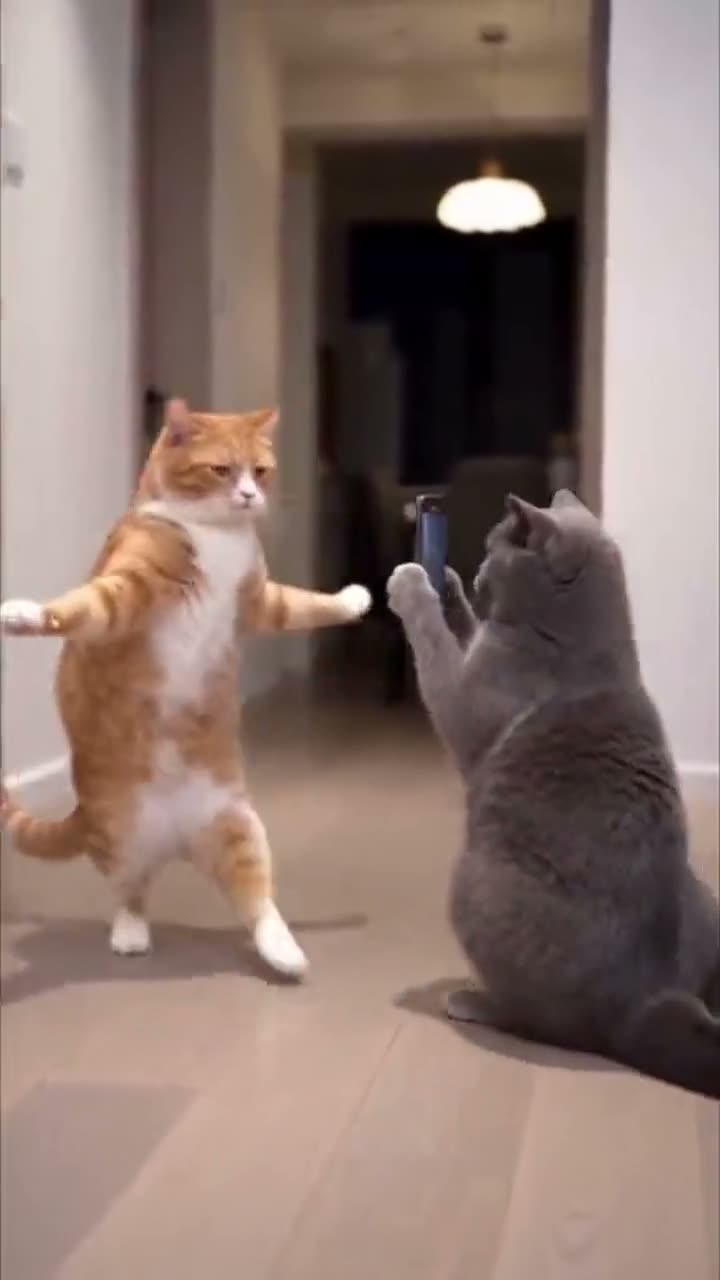 02
Side step, arms wide
Both front legs stretch straight out from the shoulders and the body turns sideways toward the filming cat, feet stepping apart on the wood floor.
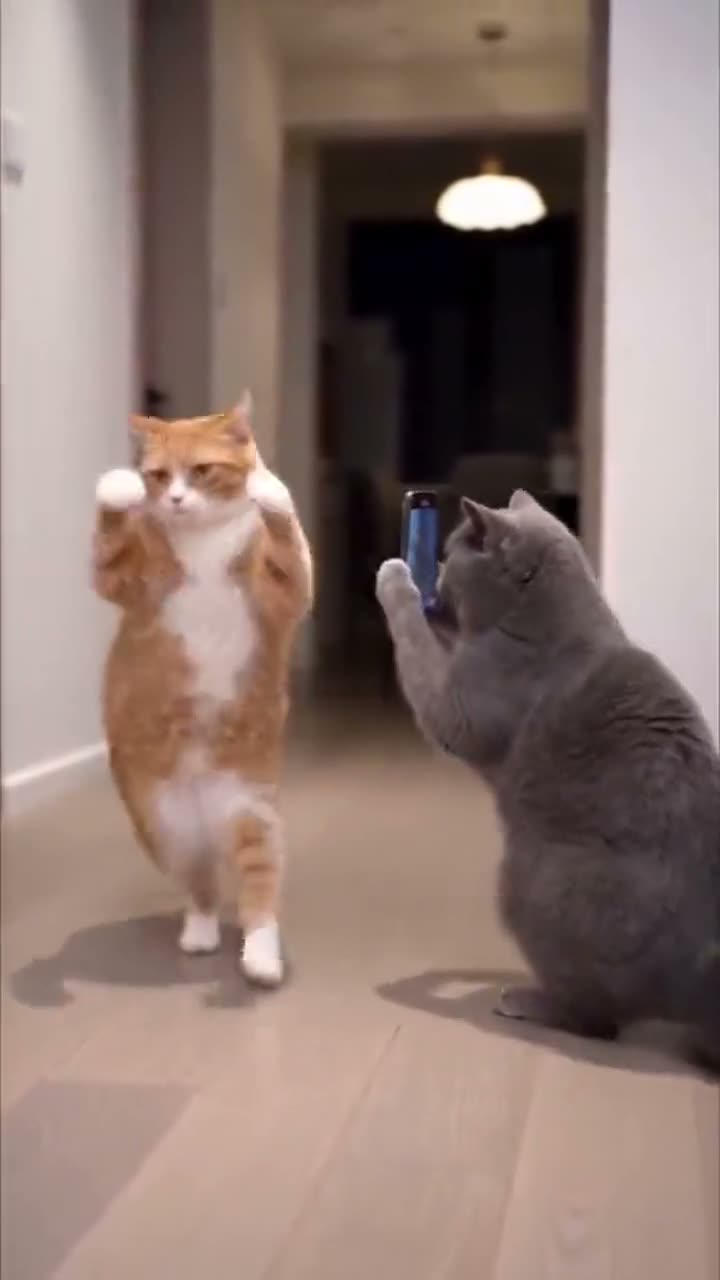 03
Paws up by the ears
Square to the camera now and closer than at the start, both paws raised beside the head at ear level, one hind foot lifted off the floor mid-step.
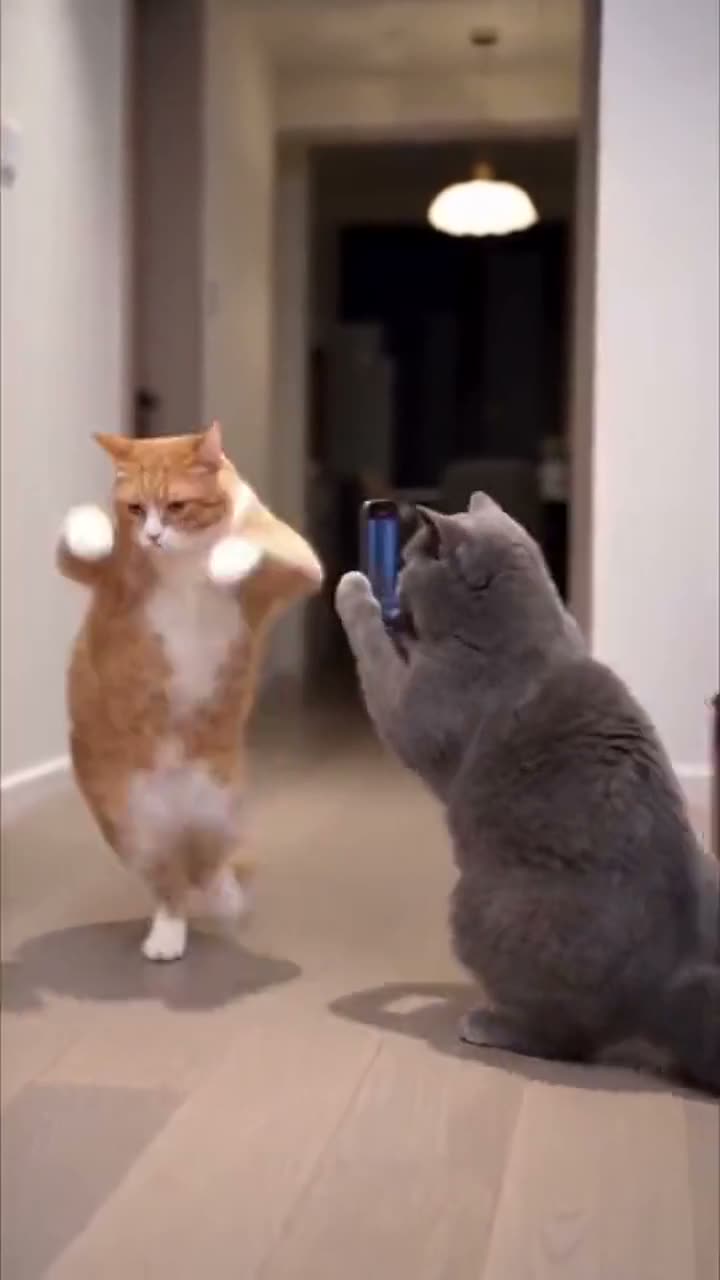 04
The last steps in
Closest to the lens at the end, paws back up at the shoulders and head flicking to the side, while the gray cat is still sitting in the corner with the phone held up.
One template, three clips
Every clip below comes straight from the template, so the hallway, the floor, the fixed camera and the timing you see are what you get back. The first photo goes to the animal that stands up and dances. The second goes to the one sitting in front with the phone, and each animal keeps its own species, coat and markings.
Three steps, no prompt
- HALLWAY CAT DUO · 15S
RATIO9:16QUALITY480PCheck the slots
One template, 15 seconds in 9:16, two photo slots. Slot one is the animal that stands up and dances in the middle of the hall. Slot two is the one sitting in the foreground filming it on a phone.
✓your-pet.jpg
✓your-other-pet.jpg
✓I own these photos or have permission to edit them
Add both photos
Drag them in or pick them from your library. Each photo takes one animal only, with the face and the coat clear. The two slots are not interchangeable, so the livelier looking animal goes in slot one.
cat-dance.mp4✓ 15S · 9:16 · SOUND KEPT
Render it
Tick the permission box, check the price and hit generate. The clip comes back at 15 seconds in 9:16 with the template's own sound, usually inside 15 minutes.
What makes a clean swap
- 01One animal per photo, whole body in frame if you can, taken in daylight against a plain background.
- 02Slot one carries the routine, so pick the animal whose face and coat read clearly from the front, because it faces the camera more than once.
- 03Slot two is seen mostly from the side and behind, so a photo that shows that animal's coat color and markings along the back is enough to keep it recognizable.
- 04A person photo works in either slot. The face carries over onto the template animal's body, and anyone in that photo stays fully clothed in plain everyday clothes.
- 05Only use photos of your own animals, or of animals whose owner agreed. The dancer is the one on screen, so that animal should belong to someone who is in on the joke.
EVERY TOOL, ONE BALANCE
Other templates on this site run the same trade: two photos in, one finished trend clip out.
What the hallway clip swaps
AI Cat Dance is a fixed template clip. Everything in it already exists: the warm white hallway with the columns, the light wood plank floor, the open doorway at the far end, the dome lamp burning in the room behind it, the phone in the front animal's paws and the music. Our job is to replace who is inside it.
The model takes your first photo as the only source for the animal that stands up and dances, and your second as the only source for the one sitting in the foreground filming. Each animal keeps its own species, coat color and markings, so a cat photo gives a cat and a dog photo gives a dog, and neither one turns into the ginger tabby or the gray cat from the template. The two never trade places, because the joke depends on who is performing and who is holding the phone.
Nothing else moves. Neither animal gets clothes, a collar or a hat, the phone stays gripped in the filming animal's paws at the same height in every frame, the camera stays fixed, the shot order and the pacing stay the same, and the clip stays 15 seconds in 9:16. No text is drawn on screen and the original sound is kept.
Nothing needs installing: the render runs on our servers through a video model, your photos are processed there rather than in your browser, and the job keeps going if you close the tab. Finished clips wait in your account and stay downloadable. If a render fails on our side, the credits go back to your balance.
This is a fan-made effect. It is not tied to any artist, studio or platform. No song, creator or account is named in it, and the two animals in your photos are the only identities on screen.
Before you render
▸ Do I have to write a prompt?
No typing. The hallway came with its prompt finished and locked on our side. Your whole job is dropping the dancer into slot one, the filmer into slot two, and pressing generate.
▸ What is the AI cat dance trend?
The original clip shows two cats in a home hallway: one stands up on its hind legs and works through a full dance routine, while the other sits in the foreground holding a phone and films it. It spread because the template lets you drop in your own two animals and keep everything else, the hallway, the camera, the music. This page runs that swap: photo one dances, photo two films, 15 seconds in 9:16.
▸ Which photo goes in which slot?
Slot one is the animal that stands up and dances in the middle of the hall. Slot two is the one sitting in the right foreground holding the phone. The prompt binds each photo to one role only, so swapping the two photos swaps who performs and who films.
▸ Can I use a dog photo instead of a cat?
Yes. Each animal keeps its own species, muzzle, ear shape, coat color and markings, so a dog photo gives a dog and a cat photo gives a cat. Neither one turns into the cats from the template and neither turns into a human.
▸ Can I put a person in one of the slots?
Yes, either slot takes a person photo. The face, hair and skin tone carry over onto the template animal's body, which stays an animal body in the same pose, and the person stays fully clothed in plain everyday clothes.
▸ How many photos do I need?
Two, one animal per photo. A photo with two animals in it leaves the model guessing which subject belongs in which slot.
▸ Does the video have a watermark?
No watermark, no caption and no added logo. The model is told to add no text on screen and to keep any lettering from your photos out of the hallway.
▸ How long is the result?
Fifteen seconds, vertical 9:16, with the template's own sound kept. The length matches the template exactly, so it lines up with the original clip second for second.
▸ What does it cost?
700 credits for the clip. The console quotes that number before you press generate, and new accounts start with free credits. Balance and packs are in pricing.
▸ How long does it take?
Give it 5 to 15 minutes. The page polls while you wait, but leaving is fine too: the render completes on our side and the clip lands in your account history.
▸ What if the two animals come out swapped?
Run it again. Same photos, same template, a different pass. The prompt already forbids the two identities from trading places or merging, and if a render fails on our side the credits return to your balance automatically.
▸ Can I use someone else's pet photo?
Only with their agreement. The console asks you to confirm you own the photo or have permission to edit it. See the terms and privacy notice for what you can do with renders and what happens to the photos you upload.
Put your pets in the cat dance clip
Two photos, one template, 15 seconds of one animal dancing down a hallway while the other one films it. Free credits on signup, and the price is on screen before you render.