✦ AI EFFECTS
CAT DOING LAUNDRY AI VIDEO GENERATOR
Add one photo, pick the three room chore run or the laundromat sink, and get a 10 second vertical video with your pet doing the laundry and the sound kept. No prompt to write.
1 PHOTOTWO CUTS, ONE PRICEA 10S 9:16 VIDEOUSUALLY 5 TO 15 MINUTES
TEMPLATE
Your video carries this template's sound.
THE PHOTO
YOUR PET OR YOU
Drop a photo of a cat, a dog or a person here, or click to browse
PNG / JPG, up to 5 MB
One clear, front-facing photo of a single cat, dog or person with the face in view. That subject does the laundry for all 10 seconds, and the other cat in the laundromat template stays itself.
Your video lands here
Add the photo, tick the box, then hit generate.
LAUNDRY DAY VIDEOS FOR 700 CREDITSLAUNDROMAT VIDEOS FOR 700 CREDITSPLANS FROM $4.99/MOPACKS FROM $9.99
SEE PRICING →- INPUT
- ONE CLEAR PHOTO, FACE IN VIEW
- OUTPUT
- A 10S 9:16 VIDEO
- A RUN TAKES
- USUALLY 5 TO 15 MINUTES
- THE ENGINE
- FIXED PIPELINE, NO PROMPT
UP-FRONT PRICING
Recommended packs start at $9.99 and stay valid while your account is active. Memberships start at $4.99 a month. One balance covers every image and video tool. The console shows the fixed price before you render.
Standard Pack
$9.99
700CREDITS
≈ 350images
≈ 30SOTA images
≈ 88svideo
≈ 43sSOTA video
A full issue's worth of art, plus videos for the launch.
ONE PAYMENT · NEVER EXPIRE
Pro Pack
$19.99
1,600CREDITS
≈ 800images
≈ 69SOTA images
≈ 208svideo
≈ 100sSOTA video
Batch season. Whole chapters and the videos that sell them.
ONE PAYMENT · NEVER EXPIRE
STANDARD MEMBERSHIP
$4.99/ month
1,000CREDITS EVERY MONTH
For weekly creators and side projects.
≈ 500images
≈ 43SOTA images
≈ 128svideo
≈ 62sSOTA video
NO LOCK-IN · CANCEL ANY TIME
PRO MEMBERSHIP
$19.99/ month
5,000CREDITS EVERY MONTH
For daily image and video production.
≈ 2,500images
≈ 217SOTA images
≈ 664svideo
≈ 312sSOTA video
NO LOCK-IN · CANCEL ANY TIME
Membership credits are available while the membership is active. Unused membership credits expire when the membership ends.
Image estimates use Flux 3 Klein at 1K, the lowest-priced run on the site. Video estimates use 8-second Veo 3.1 Lite videos at 720p, or Wan 3.0 at 480p for the SOTA row. The console shows the exact cost before every run.
WHAT IS THE CAT DOING LAUNDRY TREND?
The old laundry cat clip started in a 2008 music video, where a real cat stands over a laundry basin and works the cloth with its paws. From 2020 people captioned that moment cat be doing laundry and the joke kept coming back. In January 2026 an AI version sent the cat to work: hair net on, apron tied, scrubbing a red garment at a steel sink in a laundromat while a coworker brings more laundry. In November 2026 the same idea turned into a three room chore run at home, putting towels back in the wardrobe, a red cloth into the low kitchen cabinet and a pair of grey sweatpants off the balcony drying rod at night. A Cat Doing Laundry video generator puts your pet, or you, into either cut: one photo in, 10 seconds of vertical video out, sound kept. Both templates here are AI remakes of that format, and your video is generated from one still photo. People also search it as the laundry cat, the laundromat cat or cat doing chores.
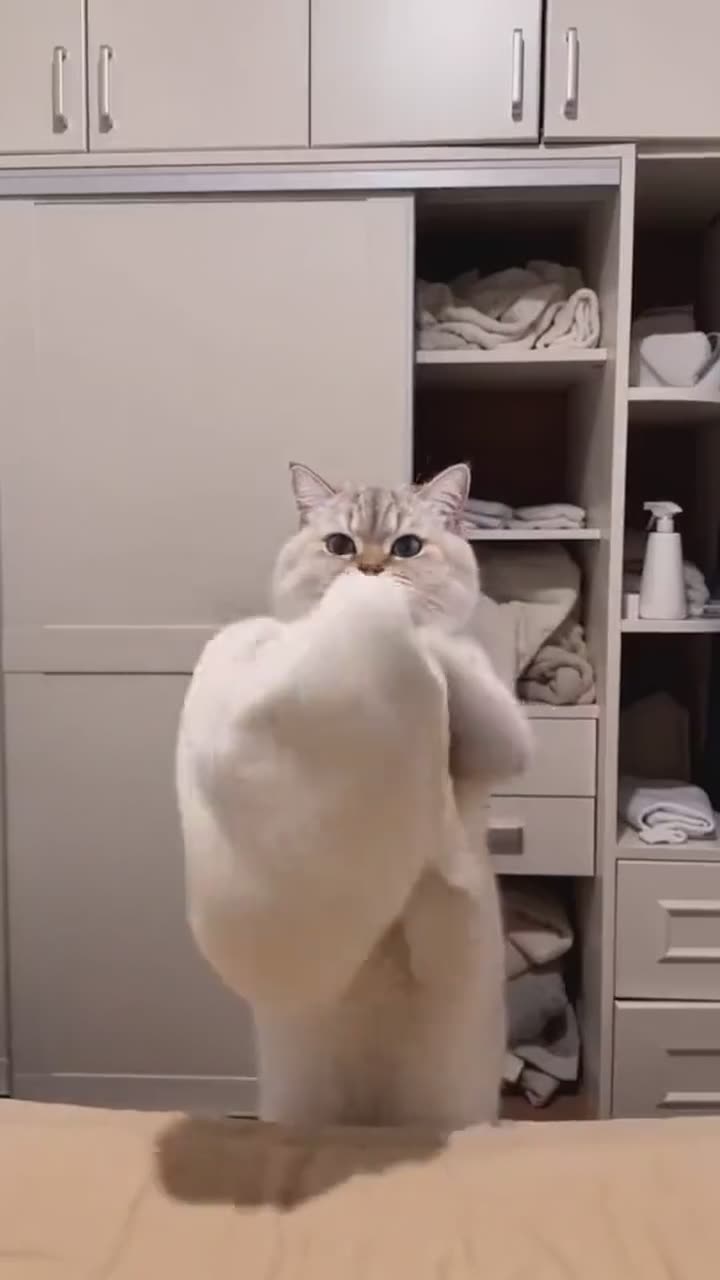 01
THE TOWEL CARRY
Upright in front of the wardrobe, one paw up on a big cream towel, heading toward the open shelf.
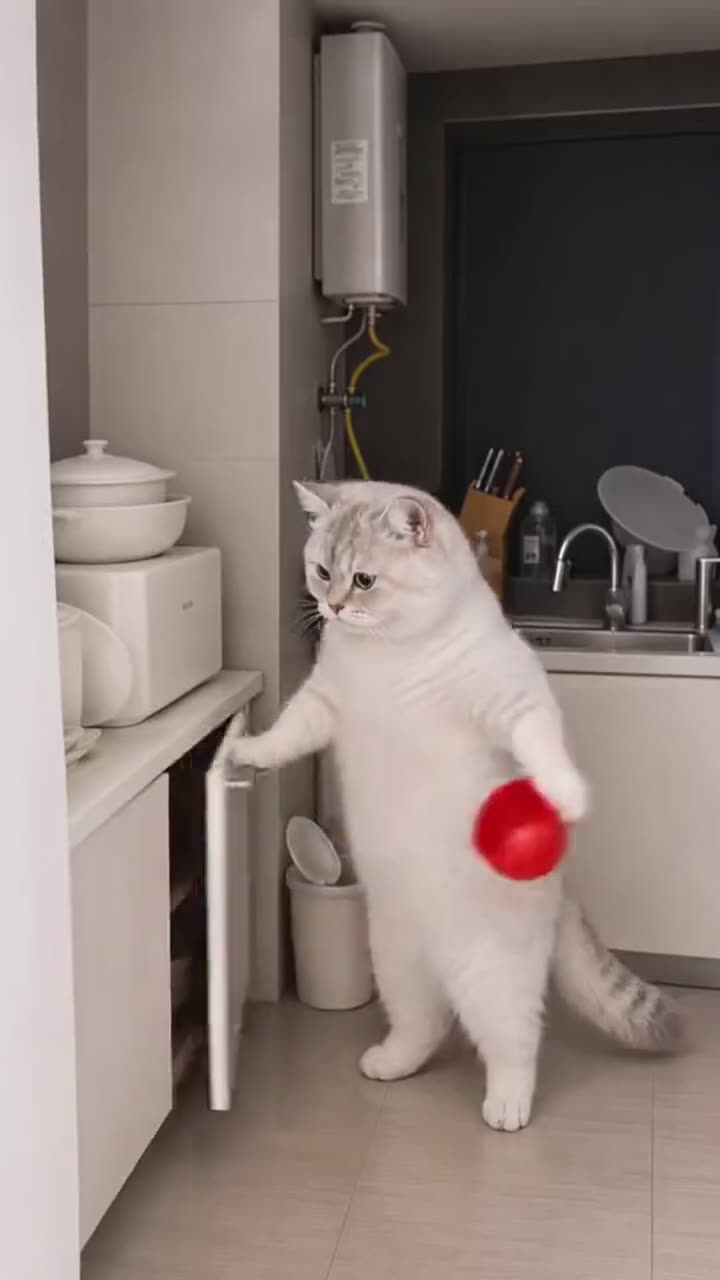 02
THE RED CLOTH
Hard cut to the narrow kitchen: the cabinet door pulled open, the red cloth in the other paw.
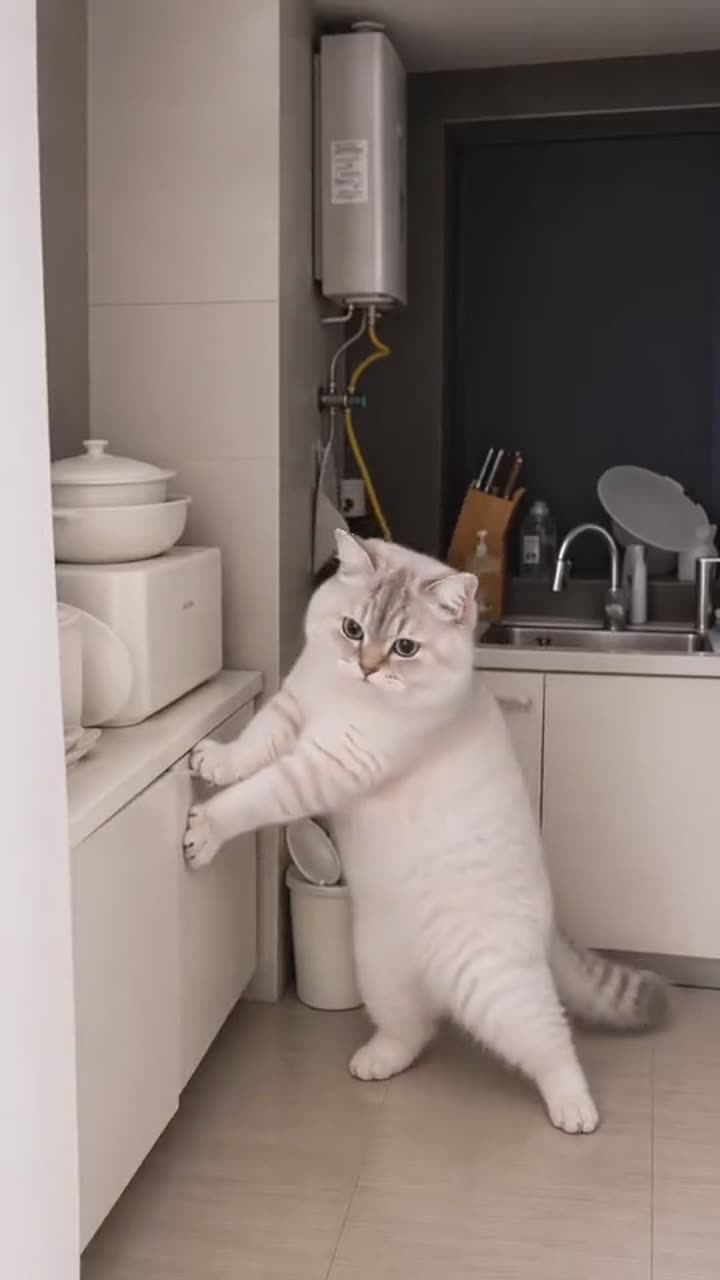 03
THE DOOR SHUT
Both front paws flat on the door, pushing it closed like it has done this every week.
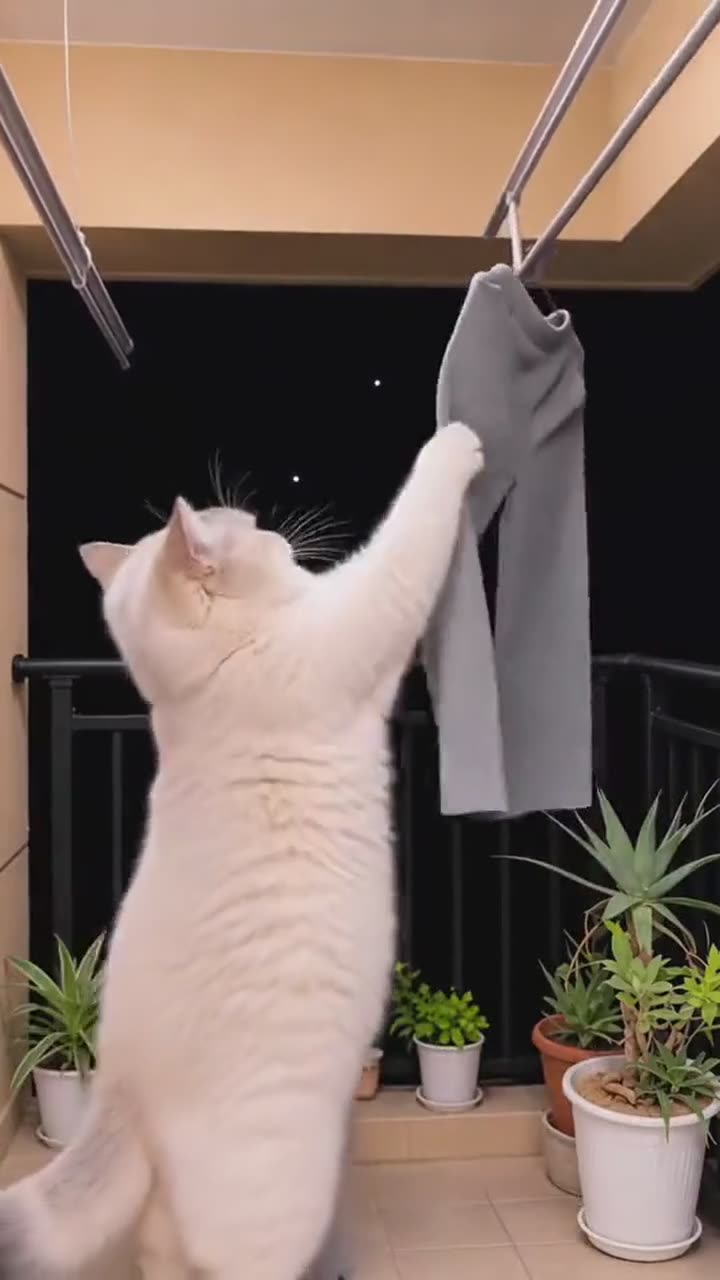 04
THE NIGHT BALCONY
Last cut: up on the balcony at night, pulling the grey sweatpants off the ceiling rod.
YOUR CAT ON LAUNDRY DUTY
The Cat Doing Laundry video generator gives you a 10-second 9:16 video at 480p with the template's own sound kept: the same wardrobe, kitchen and night balcony, or the same steel sink full of suds, the same camera moves and hard cuts you previewed, with your photo's face, ears and fur on the one doing the work. The rooms, the props and the track stay the template's, and no watermark is added. Both cuts cost the same 700 credits. The cuts below come straight from the template; yours swaps who does the laundry. Each run is an independent take, so a reroll starts from scratch.
ONE PHOTO, TWO LAUNDRY SHIFTS
- CAT LAUNDRY DAY · 10S
- CAT LAUNDROMAT · 10S
RATIO9:16OUTPUT480P · 10SWATERMARKNONEPROMPTNOT NEEDEDPICK THE SHIFT
Two templates, same price: the three room chore run at home, or the laundromat sink with a coworker cat. Both come out 10 seconds in 9:16. The card shows the price before you commit.
✓laundry-duty.jpg
✓I own this photo or have permission to edit it
DO THE LAUNDRY WITH ONE PHOTO
Add one clear photo with the face in view, then tick the permission box. A cat, a dog, another pet, a toy or a person all work. You write no prompt and open no editing app.
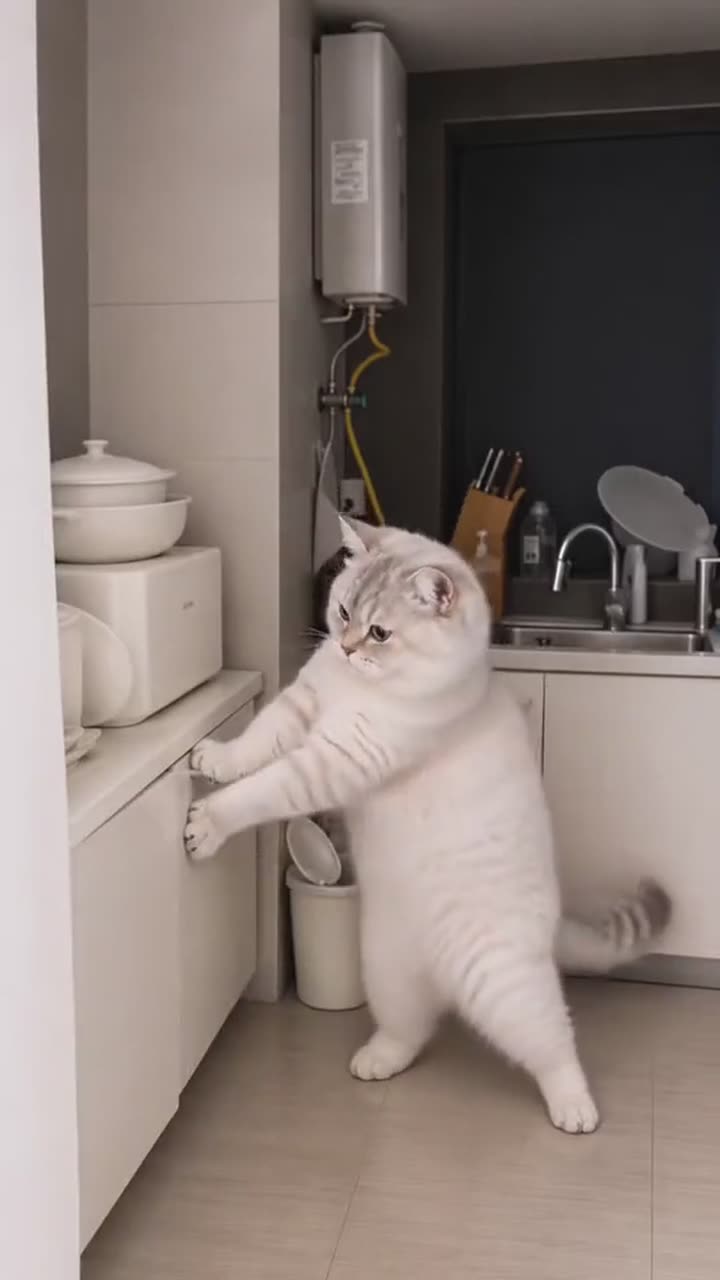
cat-doing-laundry.mp4✓ 480P · 9:16 · READY
GET THE VIDEO
A run usually takes 5 to 15 minutes. The finished 10 second video lands in the console and in your library, sound included, ready to download and post.
CAST A CAT THAT LOOKS BUSY
- 01Shoot the face, not the whole sofa. The generator takes the head, ears, muzzle and coat from your photo, so a front-facing shot in even light holds the likeness through all three cuts.
- 02Keep one subject in the frame. Two cats in the photo leaves the model guessing which one works the sink. Crop first, then upload.
- 03Pick the cut by the joke you want. Laundry day reads like a daily routine clip, so a caption about your own chore list lands. The laundromat cut reads like a work shift, and the coworker cat keeps its own face, so a caption about the job lands better.
- 04The payoff is the last second on the balcony, and the paw raised in temper at the sink. Post the full 10 seconds, and put cat doing laundry in your caption so people browsing the trend can find yours.
EVERY TOOL, ONE BALANCE
The other tools share your uploads and your credit balance. Put the same pet photo into another trend, upscale a frame you like, or hand a bigger job to the Video Maker.
THE TOOL AND THE AGENT
Cat Doing Laundry AI is PixQuill's console for the laundry cat trend: one photo in, a short video out, no editing app and no prompt writing. The templates are AI remakes of the public format, and this site is not affiliated with, sponsored by or endorsed by the music video that started it or the accounts that kept it alive. The oldest version of it, a 2008 music video, really did film a cat at a laundry basin; the clips that made the trend this time were already AI made, and so is yours: every file here comes from a still photo.
Under the hood it is one fixed pipeline: Seedance 2.5 renders a 10 second 480p 9:16 video priced at 700 credits, with the template's own sound carried over by instruction. The face, ears and fur come from your photo. The rooms, the towel, the red cloth, the sweatpants, the suds and the uniforms come from the template. In the laundromat cut only the worker at the sink changes, and the coworker cat stays itself.
The tool shares everything with the rest of PixQuill: one credit balance across the image consoles and the Video Maker, uploads you can reuse, and one library that keeps every finished file. A run that fails on our side refunds its credits automatically. If a frame turns out well, the same balance upscales it or sends it to the Video Maker for a bigger job.
STRAIGHT ANSWERS
▸ What is the cat doing laundry trend?
A cat working a laundry task with its own paws, first as a real clip of a cat standing over a laundry basin in a 2008 music video, then as a caption joke, and now as AI videos. The two current forms are the three room chore run at home and the laundromat shift where the cat wears a hair net and an apron at a steel sink. This generator does both from one photo. More of the trend wall lives in the video effects gallery, and the Can I Ride Dance AI has its own laundry room cut with a towel on the head.
▸ How do I make a cat doing laundry AI video?
Pick the template, add one clear photo, tick the permission box and hit generate. The button shows the price first. The console keeps the scene, the camera moves, the props and the sound from the template and only changes who does the laundry, so there is no prompt to write and no editing app to open.
▸ Can a dog, a rabbit or another pet do the laundry?
Yes. The photo drives the face, ears, muzzle, fur colours and markings, so a dog photo gets a dog, a rabbit photo gets a rabbit, and the animal keeps its own species and coat in every frame. A stuffed toy works too, and so does a person. The Dog Bartender AI puts a dog behind a bar instead if you want the same pet in a different uniform.
▸ Will my pet turn into a person?
No. Your pet stays an animal: same species, same head shape, same body build, and it only stands upright for the beats where the template does. Its hands stay real animal paws, never human hands. If the photo shows a person, that person stays a person.
▸ In the laundromat cut, does the coworker cat become my cat?
No, and that is the point of the template. The coworker that brings more laundry is a template character: it keeps its exact own face, fur colours and markings from the reference video in every frame, and it never takes on the look of your photo. Only the worker at the sink changes. The two cats never blend into one body or trade faces.
▸ Laundry day or laundromat: which one should you make?
Same photo, same 10 seconds, same price, so pick by the joke. Laundry Day is the three room chore run, towels to the wardrobe, cloth to the kitchen cabinet, sweatpants off the balcony rod, and your pet wears nothing but its own fur, which suits a caption about your daily routine. Cat Laundromat is the work shift: hair net, blue shirt, white apron, suds and a coworker cat that keeps its own face while it brings more laundry, which suits a caption about the job. The wardrobe cut is the one people recognise first.
▸ Where do the fur colours and the room come from?
Split two ways. The face, head, ears, muzzle, fur colours, fur length and markings come only from your photo. The room, the towel, the red cloth, the grey sweatpants, the washing machines, the suds and the uniforms come only from the template, and the background of your photo is not used at all.
▸ Is this the original laundry cat video?
No. Both templates are AI remakes of the public format, not the clips that started it, and this site is not affiliated with, sponsored by or endorsed by the video that started the meme or the accounts that spread it. Your result is generated from one still photo. Every app we know of has a setting to label AI-made content, so switch it on when you post.
▸ What are the output specs?
A 10 second MP4 at 480p in the vertical 9:16 frame, the same length and shape as the template you previewed, with sound and no watermark. Both templates run the same length and cost the same.
▸ Do I need to write a prompt?
No. Each template carries its own fixed prompt on our side, built shot by shot from the reference video, so the scene, the actions and the timing stay the same for everyone. You only pick a template and add a photo.
▸ Why does my video look a little different every time?
Because every run is a fresh generation, not a copy of the preview. The scene and the beats stay locked, but fur edges, paw positions and the exact tilt of a towel come out new each time. A reroll starts from scratch and costs the same again.
▸ How much does the cat doing laundry generator cost?
Both templates are a flat 700 credits per video. The price shows on the button before you generate, and the same balance covers the image tools. Packs and memberships are on the pricing page.
▸ Is it free?
You start free: new accounts get free credits that work across the image tools and the video consoles right away. Each video is a flat 700 credits, and the price sits on the button before you commit. If a run fails on our side, the credits refund automatically, in full. Packs and memberships are on the pricing page.
▸ How long does a run take, and what if it fails?
Usually 5 to 15 minutes. You can close the tab; the run keeps going on our servers and lands in your library under Works. If a run fails on our side, the credits refund automatically, in full.
▸ Does the video keep the original sound?
The soundtrack follows the template's own track, carried over by instruction, so it lands where you heard it in the preview. The model changes who is on screen and leaves the sound alone.
▸ Which photos work best?
One clear, front-facing photo of a single subject with the face and ears in view, in even light. The video follows the photo, so sharp input matters. Only upload photos you own or have permission to edit, and do not use the tool to impersonate anyone. The console asks you to confirm this before generating.
▸ Can I post it to my usual apps?
Yes. Every video is a 9:16 MP4 with sound, the shape the vertical feeds expect, so download it from the console or your library and upload it like any other file. Label it as AI-made, and put cat doing laundry in the caption so people browsing the trend find yours.
▸ Does the video have a watermark?
No. The file is a clean video with no watermark or logo baked in, so what you download is what you post.
▸ Can I use the videos commercially?
Videos you generate are yours to use within our terms of service. Rights in the photos you upload stay where they were, so only use photos you own or have permission to edit, and keep in mind that a likeness you did not shoot still belongs to whoever it shows. Details live on the Copyright page.
▸ What happens to the photos I upload?
PixQuill uses them to make your video. The photo goes to the AI provider for that run, then stays in your own library next to the finished video. PixQuill does not train AI models on your uploads without your explicit consent. The Privacy Policy has the details, and the Bull AI Trend shows the same pipeline on a different meme.
PUT YOUR CAT ON LAUNDRY DUTY
Pick the chore run or the sink shift, drop in one photo, and the console does the whole laundry scene for you. New accounts start with free credits, and runs that fail on our side refund automatically.