✦ AI EFFECTS
HUNGER GAMES DANCE AI VIDEO GENERATOR
Add one photo for the 24 second solo, or two for the 15 second duo, and get the dance with the sound kept. No prompt.
ONE OR TWO PHOTOSDUO 15S, SOLO 24SDUO 700, SOLO 1500USUALLY 5 TO 15 MINUTES
TEMPLATE
Your video carries this template's own sound.
YOUR PHOTOS
One clear, front-facing photo per dancer. For the duo the first photo is the dancer who starts on the left and the second is the dancer who starts on the right, and the two must be different people. For the solo, show the dancer head to toe. That face is what the dancer keeps for all 15 or 24 seconds, through the side swap and the close-up at the end.
ASPECT RATIO
Your video lands here
Pick duo or solo, drop in the photos, tick the box, press generate.
HUNGER GAMES DANCE DUO CUTS FOR 700 CREDITSHUNGER GAMES DANCE SOLO CUTS FOR 1500 CREDITSPLANS FROM $4.99/MOPACKS FROM $9.99
SEE PRICING →- WHAT YOU ADD
- Two photos for the duo, one for the solo
- WHAT YOU PICK
- Hunger Games Dance Duo or Hunger Games Dance Solo
- WHAT COMES BACK
- A 15s or 24s 9:16 video, sound kept
- WHAT IT COSTS
- 700 credits for the duo, 1500 for the solo
- HOW LONG IT TAKES
- Usually 5 to 15 minutes
- IF IT FAILS
- Credits come back, on our side
UP-FRONT PRICING
Recommended packs start at $9.99 and stay valid while your account is active. Memberships start at $4.99 a month. One balance covers every image and video tool. The console shows the fixed price for the cut you picked before you render.
Standard Pack
$9.99
700CREDITS
≈ 350images
≈ 30SOTA images
≈ 88svideo
≈ 43sSOTA video
A full issue's worth of art, plus videos for the launch.
ONE PAYMENT · NEVER EXPIRE
Pro Pack
$19.99
1,600CREDITS
≈ 800images
≈ 69SOTA images
≈ 208svideo
≈ 100sSOTA video
Batch season. Whole chapters and the videos that sell them.
ONE PAYMENT · NEVER EXPIRE
STANDARD MEMBERSHIP
$4.99/ month
1,000CREDITS EVERY MONTH
For weekly creators and side projects.
≈ 500images
≈ 43SOTA images
≈ 128svideo
≈ 62sSOTA video
NO LOCK-IN · CANCEL ANY TIME
PRO MEMBERSHIP
$19.99/ month
5,000CREDITS EVERY MONTH
For daily image and video production.
≈ 2,500images
≈ 217SOTA images
≈ 664svideo
≈ 312sSOTA video
NO LOCK-IN · CANCEL ANY TIME
Membership credits are available while the membership is active. Unused membership credits expire when the membership ends.
Image estimates use Flux 3 Klein at 1K, the lowest-priced run on the site. Video estimates use 8-second Veo 3.1 Lite videos at 720p, or Wan 3.0 at 480p for the SOTA row. The console shows the exact cost before every run.
Hunger Games Dance
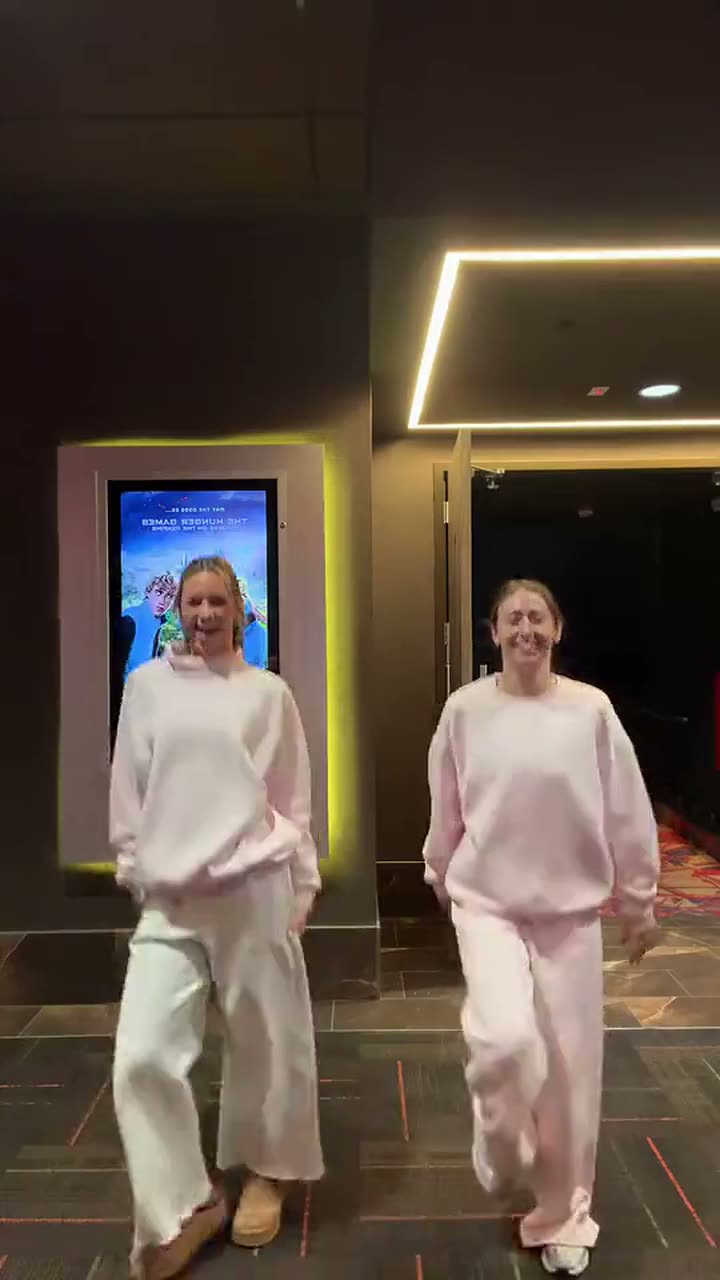
Two dancers in pale pink sweatshirts dance in a dim lobby corner: one arm shot straight overhead, both hands clamped over the mouth, a low sideways step, a full turn that flings the hair out flat, and then the two cross in the middle and finish on opposite sides of the frame. The solo cut is the same kind of dancing in a living room instead, 24 seconds long, with a bend at the waist, a full spin and a last step in close to the lens. The rooms, the outfits, the counts and the remix are already in the clip. The only thing that changes is who is dancing.
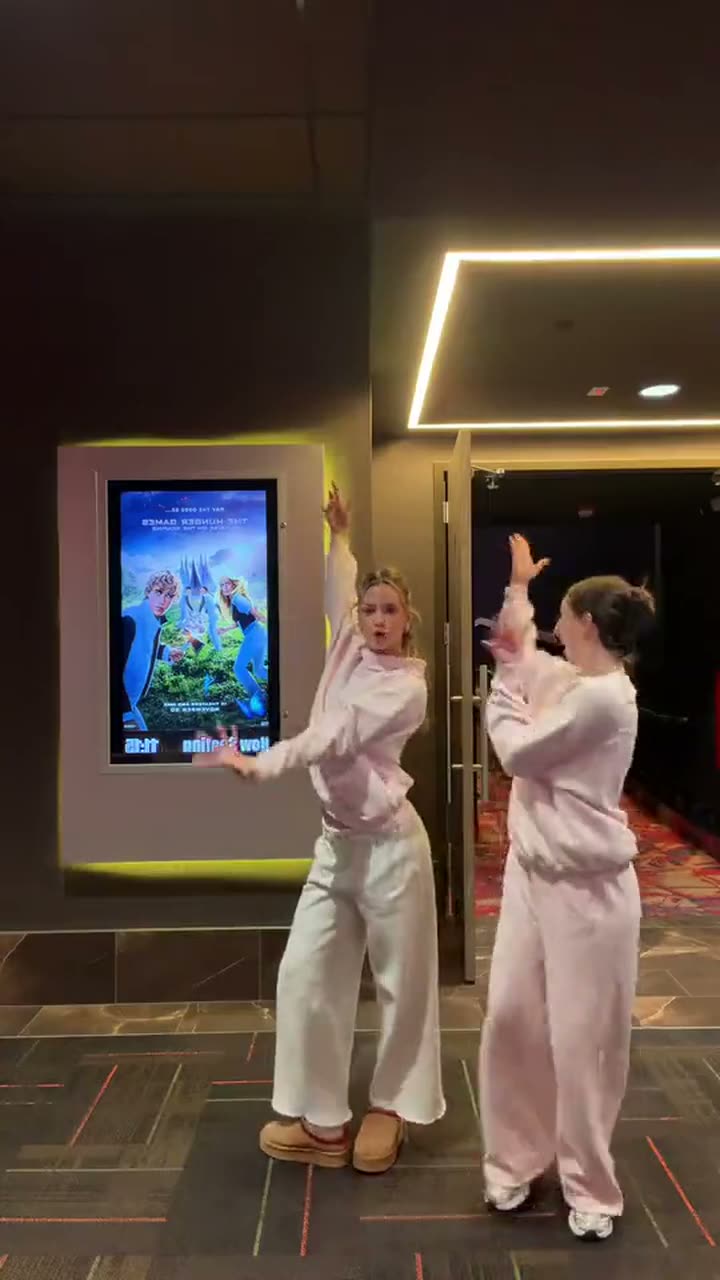 01
Arms Up On Both Sides
Both dancers are already moving on the first beat. The one on the left has an arm straight over her head and the other hand swung out low at her side. The one on the right is turned toward her with both palms raised beside her head.
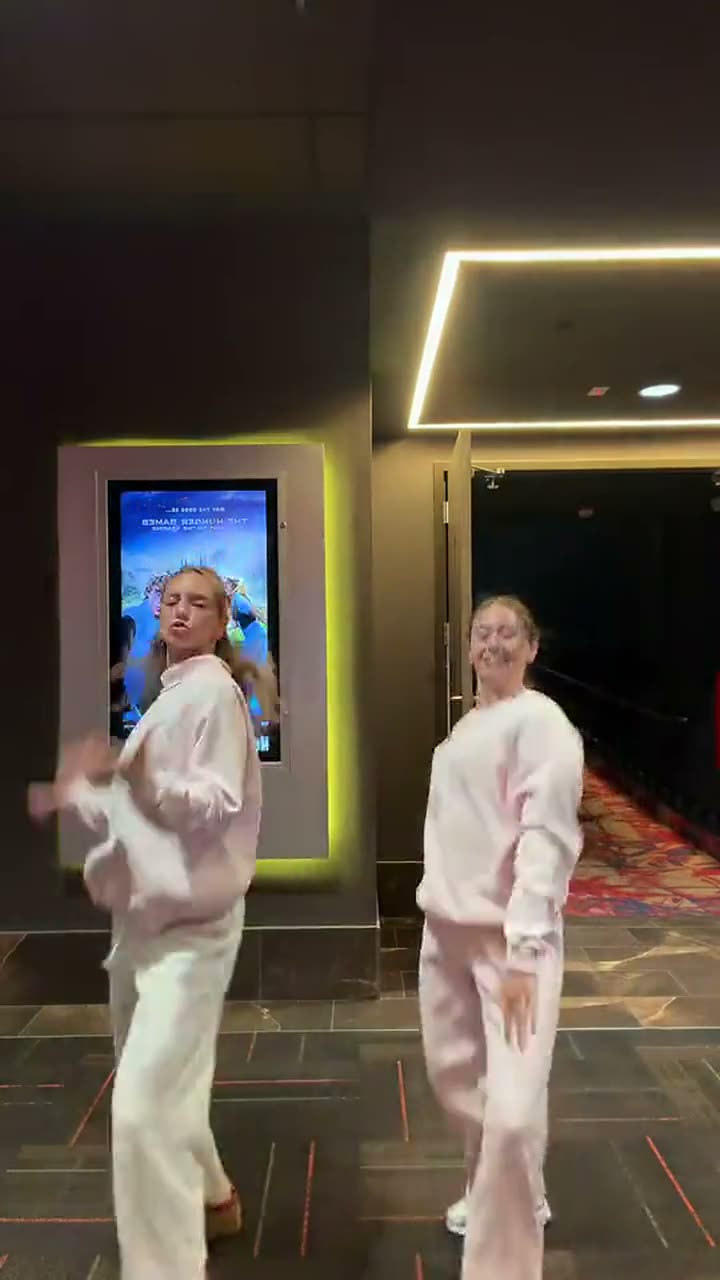 02
Low And Sideways
By about 5 seconds they drop into a low sideways step. One turns half away so her hair swings across her shoulder, and the other stays square to the lens with her hands brushing down her thighs.
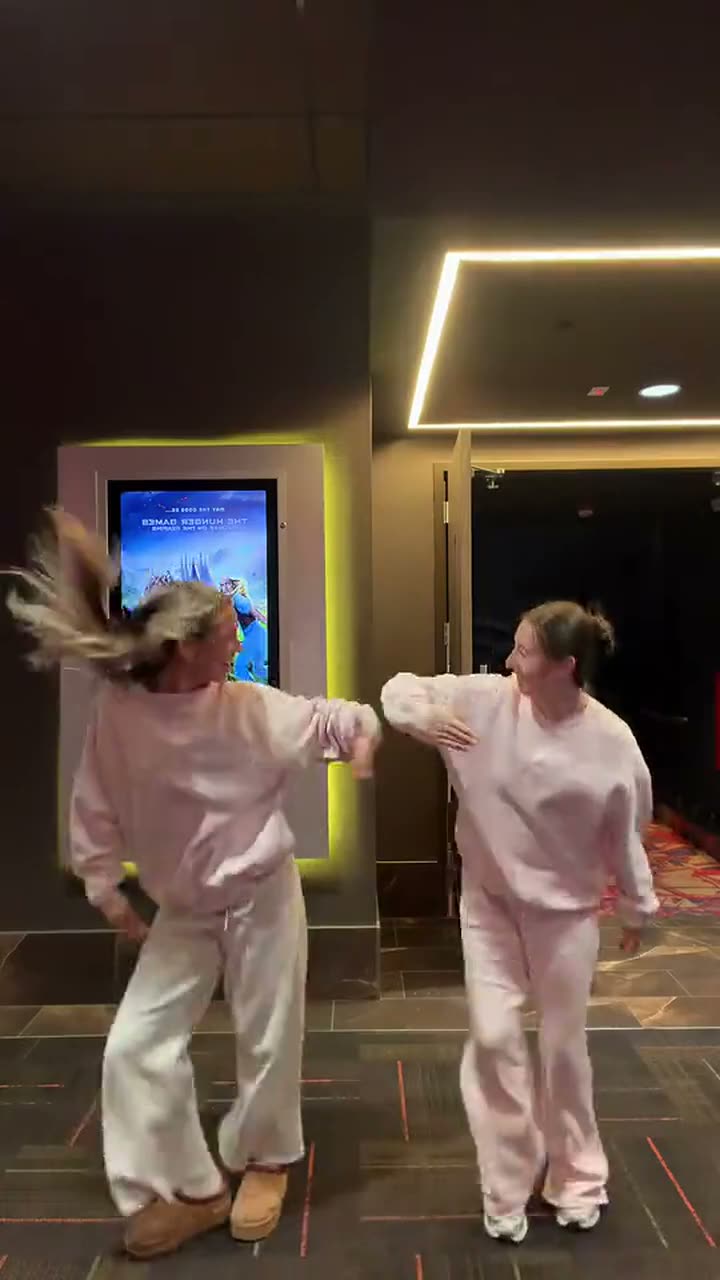 03
The Hair Whip
Near 9 seconds one of them takes a full turn and flings her hair out flat to the side, while the other leans in with an arm stretched across between them.
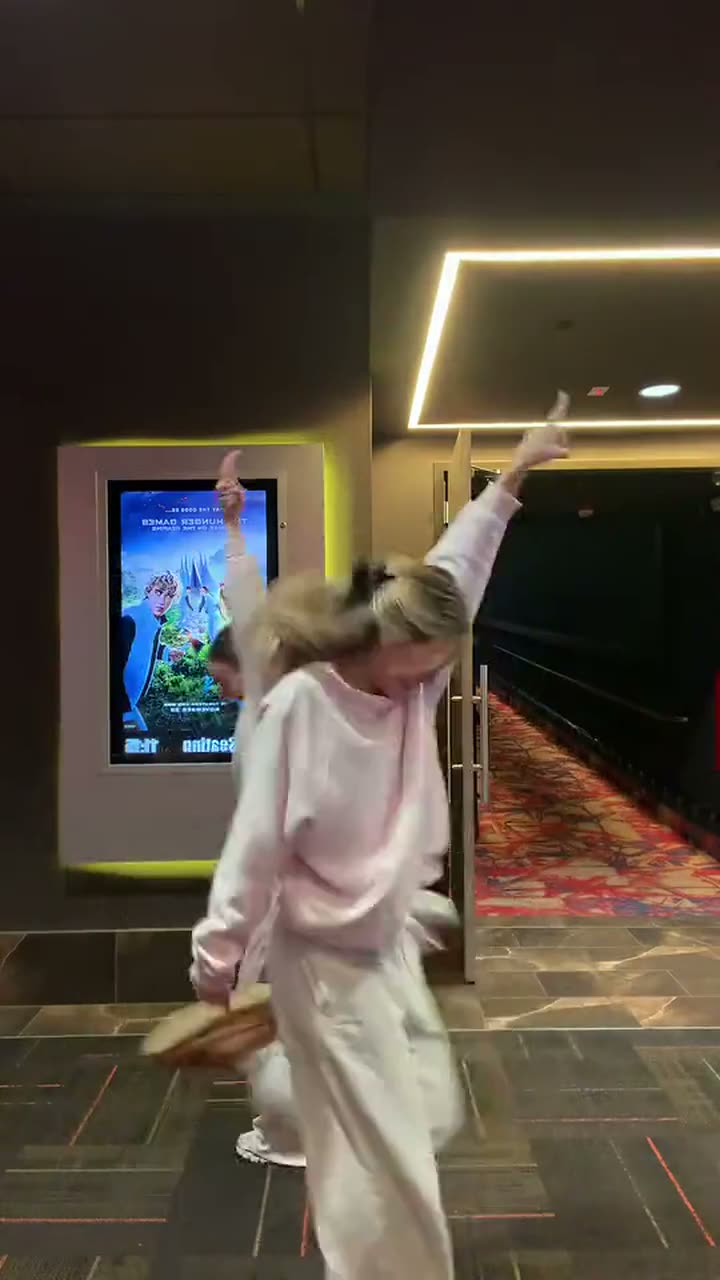 04
The Crossing
Around 13 seconds the two meet in the middle, one punching an arm overhead with a foot off the floor and the other pressed in close behind her. They come out of it on opposite halves of the frame, and that is where the clip ends.
One duo cut, one solo cut
Both clips below come straight from a template, so the lobby, the living room and the timing are what you get back. Hunger Games Dance Duo is the 15 second version: two photos, two dancers, and the swap of sides at the end. Hunger Games Dance Solo is the 24 second version: one photo, one dancer, the whole routine in front of a carpeted staircase. The solo runs longer, so it costs more, 1500 credits against 700 for the duo.
Three steps, no prompt
- HUNGER GAMES DANCE DUO · 15S · 2 PHOTOS
- HUNGER GAMES DANCE SOLO · 24S · 1 PHOTO
RATIO9:16QUALITY480PPick the cut
Duo takes two photos, one for each dancer, and runs 15 seconds in the lobby. Solo takes one photo and runs the full 24 second routine in the living room. They are different lengths, so they are different prices, and the console shows both.
✓you.jpg
✓your-friend.jpg
✓I own this photo or have permission to edit it
Add your photos
One clear, front-facing photo per dancer. For the solo, stand far enough back to be in frame from head to shoe: the routine has a low step and a full turn in it, and the last second is a close-up of the face.
hunger-games-dance-duo.mp4✓ 15S · 9:16 · SOUND KEPT
Render it
Tick the permission box, check the price and hit generate. The clip comes back at 15 or 24 seconds in 9:16 with the template's own sound, usually inside 15 minutes.
What makes a clean swap
- 01One person per photo for the duo. The console will not let the same photo fill both slots, because two slots mean two different dancers.
- 02Pick photos where both faces are readable. The duo swaps sides near the end, and each face has to stay with its own person rather than with the left or right half of the frame.
- 03For the solo, shoot far enough back to get head to shoe. The routine drops low and turns all the way around, and a cropped photo has nothing to work with on the turn.
- 04Get agreement before you upload. Nobody signs up for a dance video after the fact, and a face is not yours to put on a moving body.
- 05Good light beats a big file. A sharp daylight photo swaps steadier than a dark 4K one, and a face already half in shadow stays half in shadow in the close-up.
EVERY TOOL, ONE BALANCE
Other trend pages here run the same deal: photos in, one fixed cut out, price on screen before you render.
Two rooms, two routines, one thing swapped
Hunger Games Dance is a fixed template effect. The lobby corner with its lit poster case and neon framed doorway, the two pale pink sweatshirts, the living room with the carpeted staircase and the wall mirror, every count, every turn and the remix are all already in the clip. The model has one job: put your faces on the dancers.
The duo cut is the harder of the two, because the dancers cross over near the end. Each photo is bound to one person rather than to one side of the frame, so the dancer who starts on the left is still the same face when she finishes on the right. Nothing from your photos is used for the room, the outfits or the background, and the two faces never blend, average out or trade features.
The solo cut is a different room and a different routine, 24 seconds long, and it ends with the dancer stepping in close until her face fills the frame. That close-up comes from your photo too. The print on the sweatshirt stays exactly as the template filmed it, mirrored the same way, and nothing is drawn into the frame.
No app and no install step: the photo goes up and a video model renders it on our servers, so the queue keeps working after you leave the page. Every finished clip waits in your account and stays downloadable. If a render fails on our side, the credits land back on your balance.
This is a fan-made effect. It recreates the look of a dance trend, and it is not affiliated with, sponsored by or endorsed by any studio, film series, artist or account behind it. No footage, character name, logo or original recording is used in the template or reproduced on this page.
Before you render
▸ Do I have to write a prompt?
No. Each cut has its own prompt, written and locked on our side. You add a photo or two, pick duo or solo, and press generate.
▸ What does the Hunger Games dance trend look like?
Two dancers in pale pink sweatshirts run a short routine in a dim lobby corner: one arm shot overhead, both hands clamped over the mouth, a low side step, a hair-whip turn, then the two cross in the middle and land on opposite halves of the frame. A longer solo version takes the same idea into a living room and ends with the dancer right up on the lens. This page remakes both cuts, and the only thing that changes is who is dancing.
▸ How many photos do I need?
Two for the duo, one for each dancer. One for the solo. The duo wants two different people, so the console will not accept the same photo in both slots.
▸ How long is the result?
The duo cut is 15 seconds and the solo cut is 24, both vertical 9:16 at 480p. Each length matches its template exactly, so the beats line up with the preview you watched.
▸ What does it cost?
700 credits for the duo and 1500 for the solo, because the solo runs 24 seconds instead of 15. The console shows the price for the cut you picked before you render. New accounts start with free credits, and packs and plans are on pricing.
▸ Why do the two dancers switch sides?
That is the ending of the duo template: the two cross in the middle near the 13 second mark and finish on opposite halves of the frame. Each photo is bound to a person rather than to a side, so a face stays with the same dancer through the switch.
▸ Does the clip keep the audio from the template?
Yes, on both cuts. The remix and the spoken line you hear in the preview come back on your file, timed to the same counts, so the dance still lands on the beat. We do not lay a new recording over it.
▸ Does the video have a watermark?
No. Nothing is stamped on the result: the prompt keeps the frame as the template shot it, so there are no captions, no added logo and nothing brought in from your photo's background.
▸ How long does rendering take?
Most clips land in 5 to 15 minutes. The console polls while you sit on the page, and if you go away the render finishes anyway and waits in your account history.
▸ What if one dancer's face looks wrong?
Send the same photos through the same cut once more, since each pass is a fresh attempt. Both faces stay bound to their own dancer through the switch at the end. If a render fails on our side, the credits come back to you.
▸ Can I use a pet photo?
No. Both cuts are built around a human face and a human body, and the routine has a low step and a full turn that only work on a person. Use a photo of someone who agreed.
▸ Can I post it commercially?
See the terms and privacy notice for what you can do with renders and what happens to the photos you upload.
▸ Is this an official Hunger Games tool?
No. It is a fan-made recreation of a trend look, with no affiliation to, sponsorship from or endorsement by any studio, film series, artist or account. The template only borrows the choreography and the room, and the dancers come from your photos.
Put yourself in the dance
Two photos for the 15 second duo, one for the 24 second solo. Free credits on signup, and the price for the cut you picked is on screen before you render.