✦ AI EFFECTS
GTA 6 END OF THE WORLD AI VIDEO GENERATOR
One photo in, one GTA 6 End of the World clip out: 18 seconds in 4:3, you keep playing while the city ends outside the window, no prompt.
ONE PHOTO, ONE PLAYERTHREE DISASTERS, NO PAUSEAN 18S 4:3 VIDEOUSUALLY 5 TO 15 MINUTES
TEMPLATE
Your video carries this template's own sound.
YOUR PHOTO
One clear, front-facing photo with the whole face in view. A pet photo works too and keeps its own species. That one photo goes on the player at the desk and holds through the countdown, the fireball, the wave and the final seconds at the controller. The room, the screen and the disasters stay the template's.
ASPECT RATIO
Your video lands here
Drop the photo in, tick the box, press generate. One run, one player, three disasters outside the window.
- WHAT YOU ADD
- One photo, person or pet
- WHAT CHANGES
- The player at the desk
- WHAT COMES BACK
- An 18s 4:3 video, sound kept
- WHAT IT COSTS
- 700 credits
- HOW LONG IT TAKES
- Usually 5 to 15 minutes
- IF IT FAILS
- Credits come back, on our side
UP-FRONT PRICING
Recommended packs start at $9.99 and stay valid while your account is active. Memberships start at $4.99 a month. One balance covers every image and video tool. The console shows the fixed price before you render.
Standard Pack
$9.99
700CREDITS
≈ 350images
≈ 30SOTA images
≈ 88svideo
≈ 43sSOTA video
A full issue's worth of art, plus videos for the launch.
ONE PAYMENT · NEVER EXPIRE
Pro Pack
$19.99
1,600CREDITS
≈ 800images
≈ 69SOTA images
≈ 208svideo
≈ 100sSOTA video
Batch season. Whole chapters and the videos that sell them.
ONE PAYMENT · NEVER EXPIRE
STANDARD MEMBERSHIP
$4.99/ month
1,000CREDITS EVERY MONTH
For weekly creators and side projects.
≈ 500images
≈ 43SOTA images
≈ 128svideo
≈ 62sSOTA video
NO LOCK-IN · CANCEL ANY TIME
PRO MEMBERSHIP
$19.99/ month
5,000CREDITS EVERY MONTH
For daily image and video production.
≈ 2,500images
≈ 217SOTA images
≈ 664svideo
≈ 312sSOTA video
NO LOCK-IN · CANCEL ANY TIME
Membership credits are available while the membership is active. Unused membership credits expire when the membership ends.
Image estimates use Flux 3 Klein at 1K, the lowest-priced run on the site. Video estimates use 8-second Veo 3.1 Lite videos at 720p, or Wan 3.0 at 480p for the SOTA row. The console shows the exact cost before every run.
GTA 6 End of the World
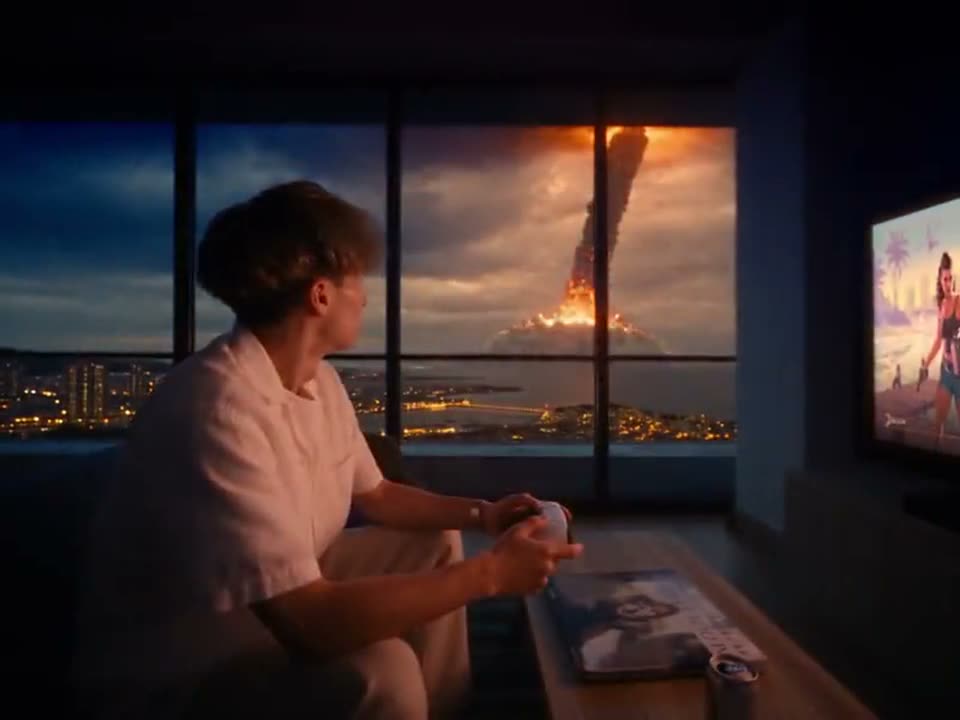
This is the keep playing while the world ends format, shot like a movie trailer for a game corner at night. The joke that ran through release week was that the world was going to end before this game landed, and the clip plays it straight: the game loads, the city finishes itself behind the player and nobody pauses. A player sits at a desk on the left with a controller, the one big screen glowing on the right, and the full city window between them. Then the disasters arrive outside: a fireball drops on the skyline, a pillar of fire and water stands over the district, a giant wave rolls across it twice. The player turns back to the desk and keeps going. The whole bit runs 18 seconds in 4:3. Our template swaps exactly one thing: the player's head becomes the face from your photo, or the muzzle from a pet photo. The room, the disasters and the timing stay.
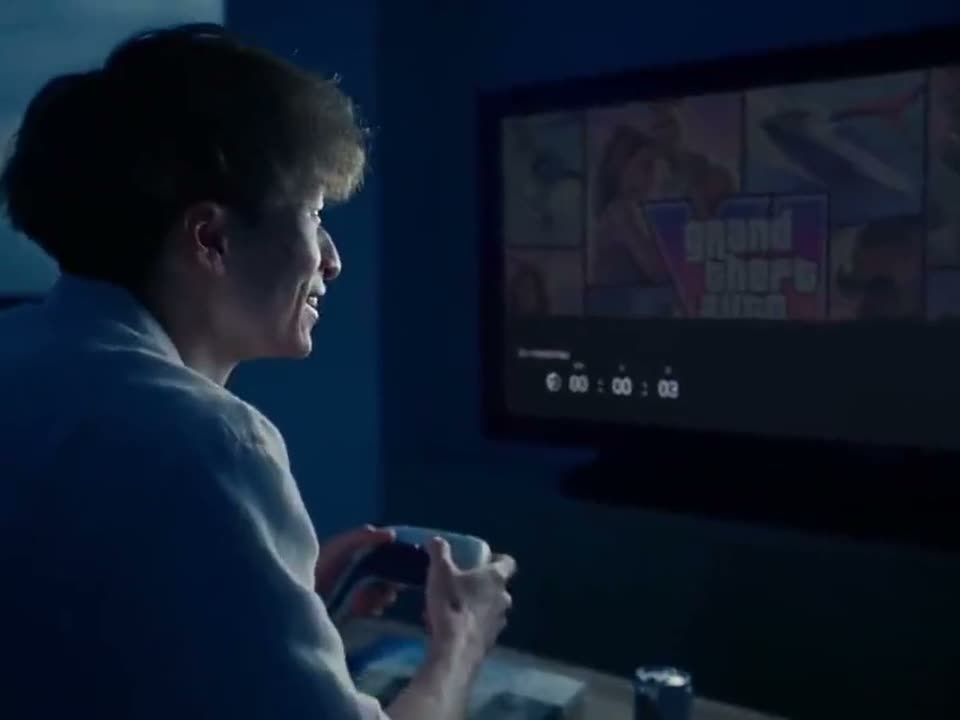 01
The room goes blue
A dark room at night. The one large screen glows at the right, a title card lit across it, and the player in a light colored short sleeved shirt holds a controller while the blue light outlines the face.
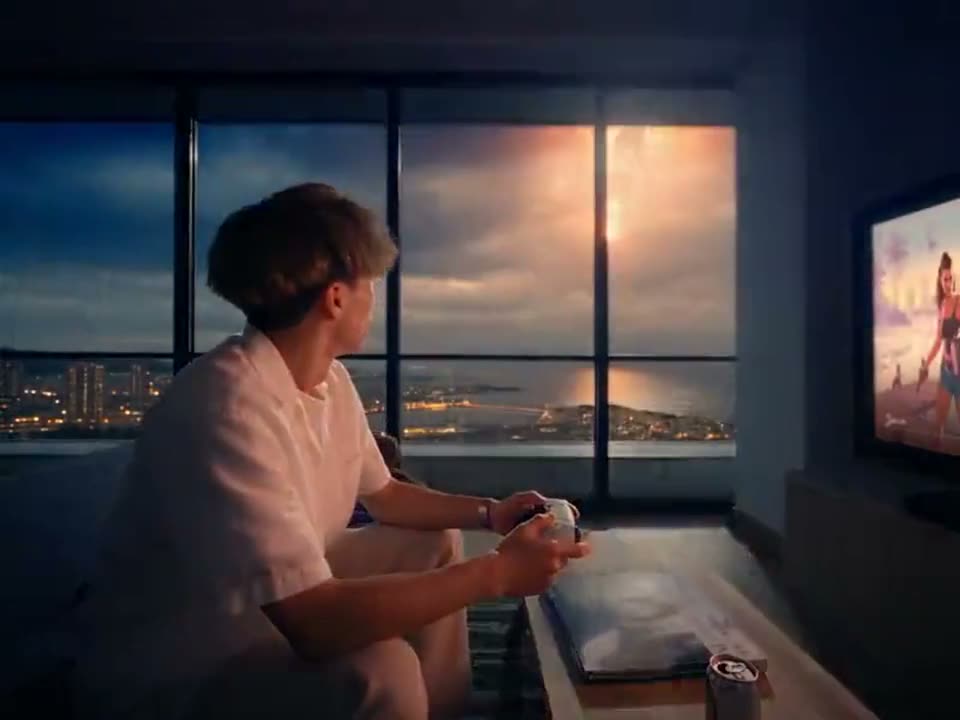 02
Something lights up outside
The full window behind the desk shows a dusk sky over the bay and city lights below. A hard warm flash floods in from outside, the first of the disasters is on its way, and the player turns toward it with the controller still in hand.
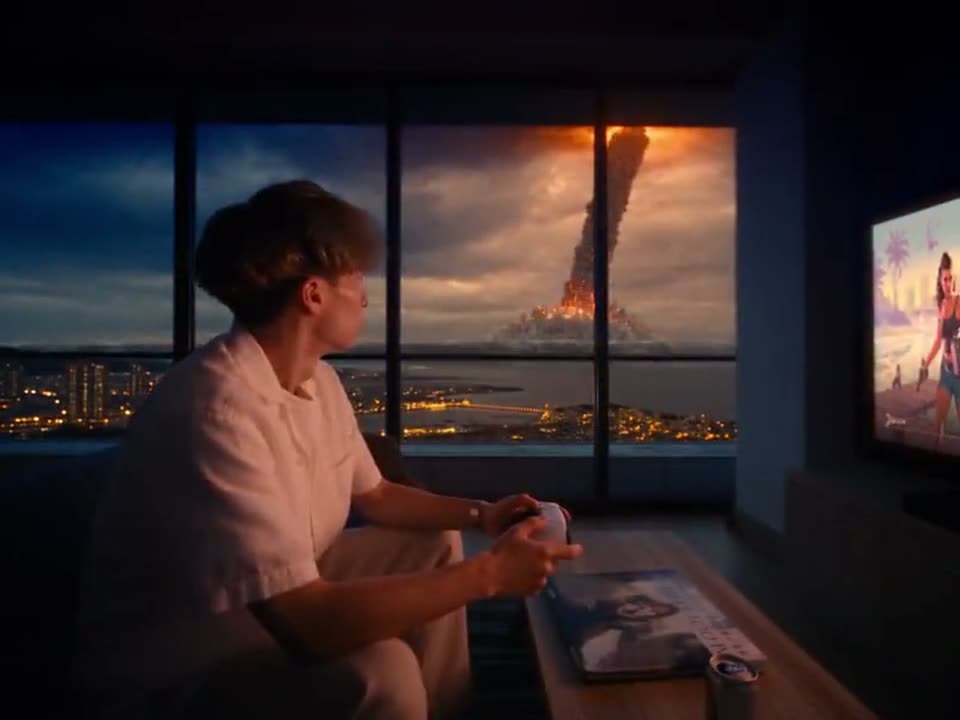 03
The pillar rises
A pillar of fire and spray stands over the district outside the window, orange against the dusk. The player watches it from the chair, game screen still lit at the right. Most people would get up. This one does not.
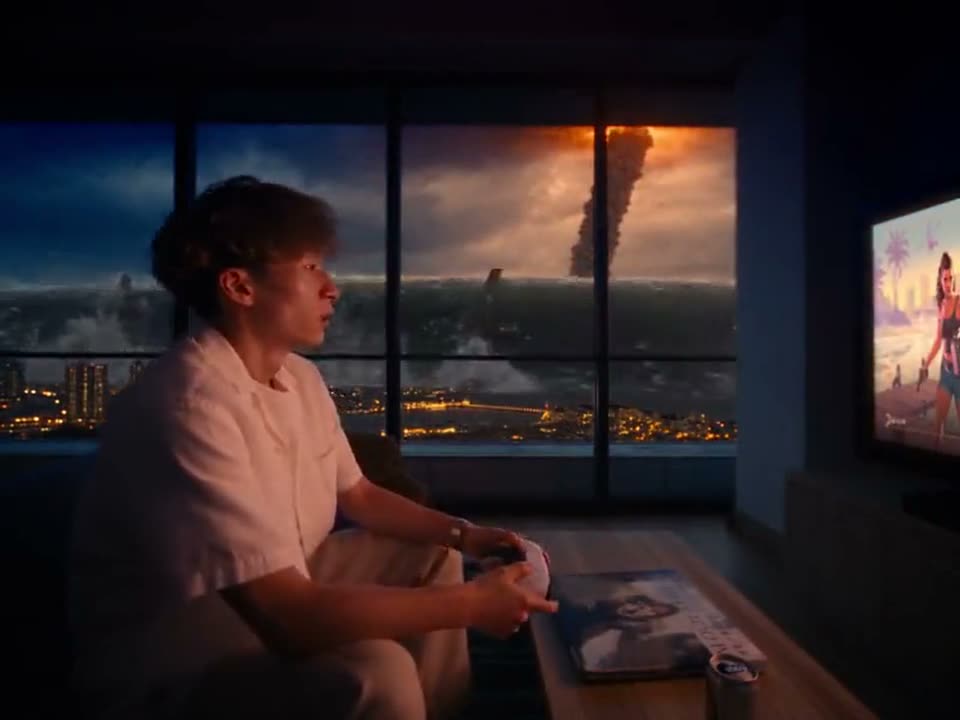 04
The wave, and still playing
A giant wave rolls across the whole skyline and the towers burn behind it, while the player sits back at the desk with the controller in hand and keeps the game running to the last second.
One photo, one fixed disaster
Every video below comes from the same template, so the room, the window and the order of the three disasters are what you get back. The three segments are one 18 second render split in three. One photo goes in and it lands on exactly one subject, the player at the desk. Nobody is added to the room, the window or the street below.
Three steps, no prompt
- KEEP PLAYING · 18S
RATIO4:3QUALITY480POpen the console
One template, one fixed cut: 18 seconds in 4:3 at 480p. The card shows the credit price before you commit, and there is nothing to configure, no voice picker and no length picker.
✓your-photo.jpg
✓I own this photo or have permission to edit it
Add your photo
Drag a photo in or pick one from your library. One clear face, whole head in frame, and a pet photo works too. It only feeds the player at the desk, so a cropped shot breaks the one role that matters.
gta-6-end-of-the-world.mp4✓ 18S · 4:3 · SOUND KEPT
Render it
Tick the permission box, check the price and hit generate. The clip comes back at 18 seconds in 4:3 with the template's own sound, spoken line included, usually inside 15 minutes.
What makes a clean swap
- 01One clear face, front and fully in frame. The swap only touches the player at the desk, and the hardest frames are the turn toward the window and the seconds lit orange by the fire, so a flat front photo binds steadier.
- 02A pet photo works. The head becomes that muzzle, ears and coat, while the light colored shirt, the seated pose and the controller stay as the template has them.
- 03The disasters are not yours to direct. The fireball, the wave and the fire pillar land at the template's own seconds, in that order, every render. That is what makes the clip read as the meme.
- 04The audio keeps its spoken line. There is no voice chooser and no setting for it: the template's own track, music and voice together, is carried into your video as it is.
- 05The room is part of the format. The desk, the screen and the city window belong to the template and stay, so send a photo of the player, not of a setup.
EVERY TOOL, ONE BALANCE
A fixed template console like our other trend pages: no settings to learn, no editing app, and the credit price is on the card before you press generate. More formats in the same shape are listed below.
The city ends, the game goes on
GTA 6 End of the World AI is PixQuill's console for the keep playing while the world ends format: one photo in, an 18 second video out, no editing app and no prompt writing. This is a fan-made recreation of a public meme edit. The site is not affiliated with, sponsored by or endorsed by any game publisher or studio, and the template uses no game assets: the room, the skyline, the fireball and the wave are our own footage.
The model changes one head, not the scene. Your photo is the only source for the player at the desk, and the species follows the photo, so a pet photo puts a pet's own head on that seated player in the light colored shirt. One player only: no second person, no rescue crew and no running figure is added to the room or the window.
Everything else is fixed: the countdown on the screen, the warm flash, the fireball, the wave, the fire pillar, the turn back to the desk, the cut order, the 18 second length and the 4:3 frame. The sound is the template's own, music and spoken line included, carried over by instruction. The site adds no watermark and no extra lettering, and whatever already shows inside the screen stays as the template has it.
Nothing installs on your device and nothing runs in the browser alone: your photo goes to a video model on our servers, so the job keeps going after you close the tab. Finished clips stay in your account and remain downloadable. If a render fails on our side, the credits go back to your balance.
Before you render
▸ Do I have to write a prompt?
No. The prompt is fixed with the template and locked on our side. You upload one photo, nothing else.
▸ What is the GTA 6 End of the World video?
It is the keep playing while the world ends edit. A player starts a game at a desk at night, then a fireball drops on the city outside the window, a pillar of fire rises and a giant wave rolls over the skyline, and the player just keeps playing. This page rebuilds that bit from one photo: 18 seconds, 4:3, the template's own sound.
▸ Can I use a pet photo?
Yes. One photo, person or pet. The head at the desk becomes your pet's own muzzle, ears and coat, while the shirt, the chair and the controller stay exactly as the template has them.
▸ Can I pick the voice for the spoken line?
No, and that is on purpose. Our pipeline exposes no generation parameters: no voice chooser, no length picker, no prompt box. The template's own audio, spoken line included, is kept as it is, which is also what keeps the lip timing and the joke intact.
▸ Does the video have a watermark?
No watermark, no caption and no site logo is added. Whatever already shows inside the screen in the template stays part of the frame, untouched.
▸ How long is the result?
Eighteen seconds in a 4:3 frame at 480p, with the template's own sound kept. The disasters land on the same seconds you previewed, so the clip lines up with the meme cut for cut.
▸ What does it cost?
700 credits for the full run, countdown to burning skyline, in one render. The console quotes that before you press generate, new accounts start with free credits, and the packs sit on pricing.
▸ How long does it take?
Expect 5 to 15 minutes on most runs. You can close the tab: the render finishes on our servers and the clip waits in your account history.
▸ Is this an official GTA 6 tool?
No. The desk, the window and the skyline are footage we made ourselves. There is no licence, sponsorship or backing from any game publisher, and the title is just the name this trend travels under.
▸ What other GTA style trends can I try?
Same console, different bits: dog playing GTA 6 for the four-legged player, the GTA 6 night drive for the street cruise, and the GTA wanted poster walk for the poster edit.
▸ Can I post it commercially?
See the terms and privacy notice for what you can do with renders and what happens to the photos you upload.
Keep playing while the world ends
One photo, one fixed cut, 18 seconds of you holding a controller while the skyline burns and floods behind you. Free credits on signup, and the price is on the card before you render.