✦ AI EFFECTS
POP POP ANIMATION AI VIDEO GENERATOR
Upload two photos and the console runs the dance party: your faces pop in as anime characters and loop the side-to-side sync, sound kept.
2 PHOTOS11 SECOND VIDEONO PROMPT NEEDED
TEMPLATE
Your video carries this template's sound.
THE TWO CHARACTERS
LEFT CHARACTER
Drop a photo of a person or a pet here, or click to browse
PNG / JPG, up to 5 MB
RIGHT CHARACTER
Drop a photo of a person or a pet here, or click to browse
PNG / JPG, up to 5 MB
One clear, front-facing photo per slot, a single person or pet with the whole head in view. Faces are redrawn in the template's 2D anime style. Two different photos.
Your video lands here
Add both photos, tick the box, then hit generate.
- INPUT
- TWO CLEAR PHOTOS, ONE PER CHARACTER
- OUTPUT
- AN 11 SECOND ANIME VIDEO
- A RUN TAKES
- USUALLY 5 TO 15 MINUTES
- THE ENGINE
- FIXED PIPELINE, NO PROMPT
UP-FRONT PRICING
Recommended packs start at $9.99 and stay valid while your account is active. Memberships start at $4.99 a month. One balance covers every image and video tool. The console shows the fixed price before you render.
Standard Pack
$9.99
700CREDITS
≈ 350images
≈ 30SOTA images
≈ 88svideo
≈ 43sSOTA video
A full issue's worth of art, plus videos for the launch.
ONE PAYMENT · NEVER EXPIRE
Pro Pack
$19.99
1,600CREDITS
≈ 800images
≈ 69SOTA images
≈ 208svideo
≈ 100sSOTA video
Batch season. Whole chapters and the videos that sell them.
ONE PAYMENT · NEVER EXPIRE
STANDARD MEMBERSHIP
$4.99/ month
1,000CREDITS EVERY MONTH
For weekly creators and side projects.
≈ 500images
≈ 43SOTA images
≈ 128svideo
≈ 62sSOTA video
NO LOCK-IN · CANCEL ANY TIME
PRO MEMBERSHIP
$19.99/ month
5,000CREDITS EVERY MONTH
For daily image and video production.
≈ 2,500images
≈ 217SOTA images
≈ 664svideo
≈ 312sSOTA video
NO LOCK-IN · CANCEL ANY TIME
Membership credits are available while the membership is active. Unused membership credits expire when the membership ends.
Image estimates use Flux 3 Klein at 1K, the lowest-priced run on the site. Video estimates use 8-second Veo 3.1 Lite videos at 720p, or Wan 3.0 at 480p for the SOTA row. The console shows the exact cost before every run.
WHAT IS THE POP POP ANIMATION TREND?
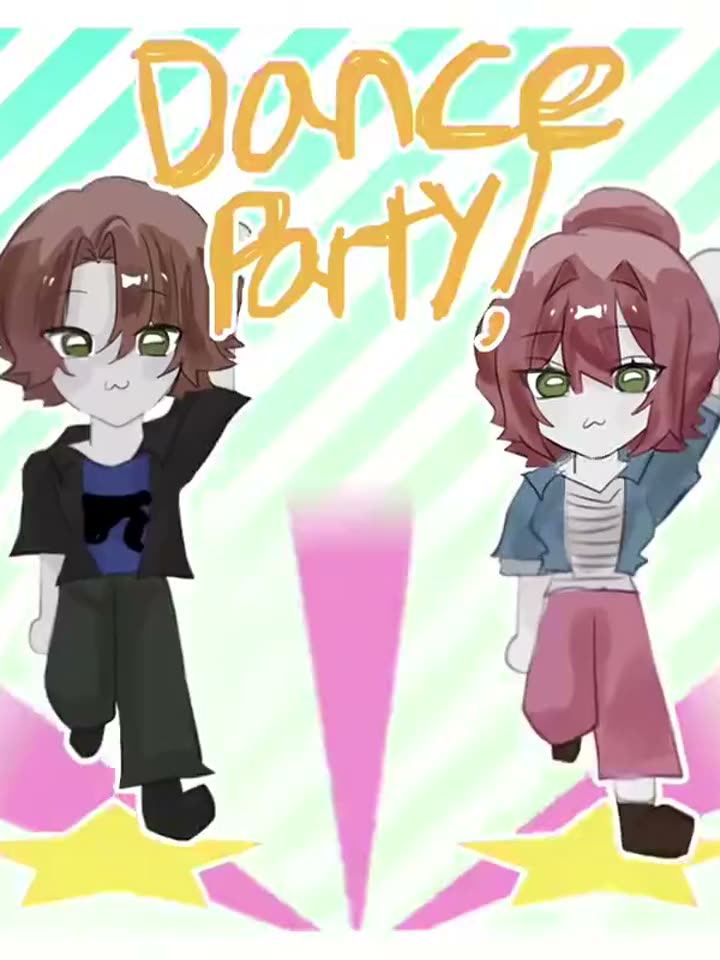
Pop Pop Animation is the anime loop trend: two chibi-style characters pop into a striped candy-color frame under a handwritten dance party title, lock into a bouncy side-to-side routine, and flip outfit and background colors on the beat while a pop text card punctuates the drops. Everything is 2D animation, nothing is live action, and the joke is how hard the loop slaps. A pop pop animation video generator redraws your two faces in the template's anime style and drops them into the loop: two photos in, eleven seconds out, sound kept.
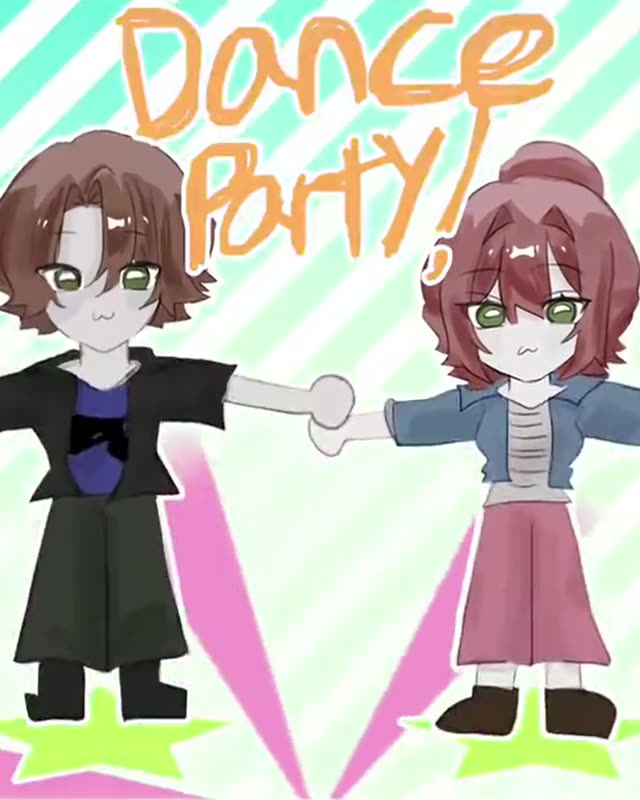 01
THE POP-IN
The two characters bounce into the striped frame, anime versions of your two photos.
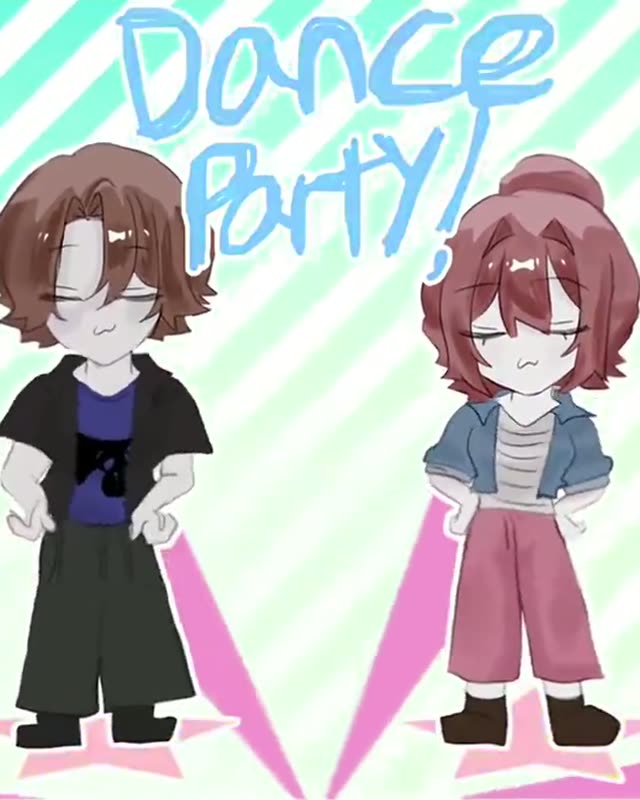 02
THE LOOP
The pair locks into the side-to-side routine, arms and hips on the template's count.
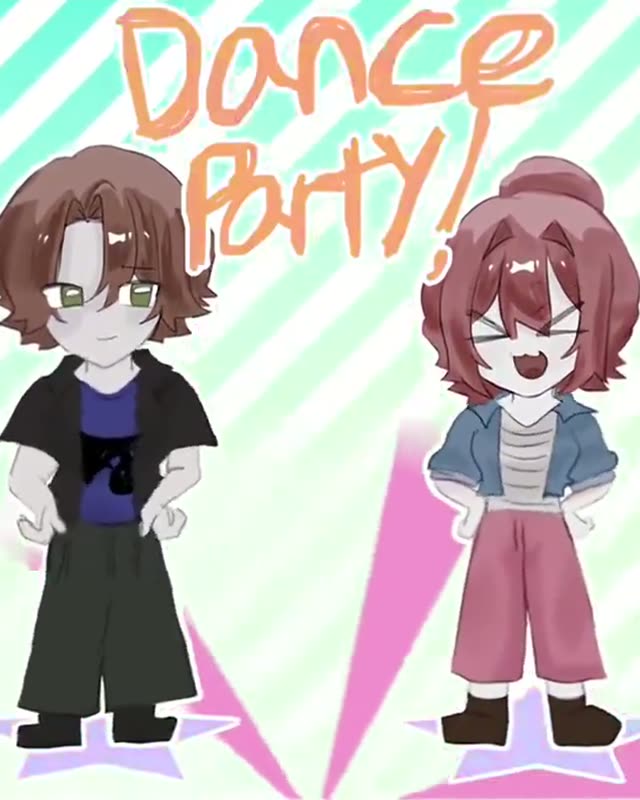 03
THE PALETTE FLIP
Outfits and background flip between purple, green and teal, landing on the beat.
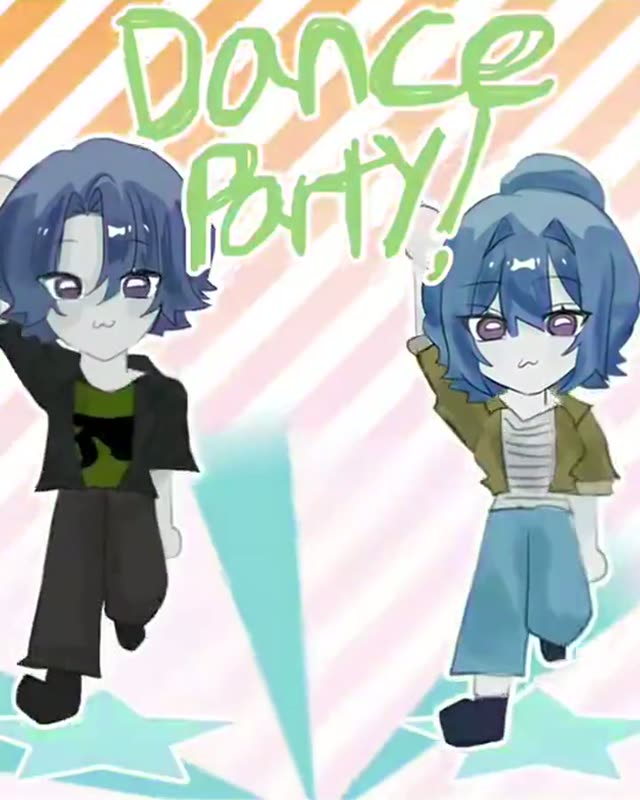 04
THE POP CARD
The pop text card punctuates the drop, the loop rolls on, and the exit lands clean.
YOUR FACES IN THE LOOP
The Pop Pop Animation AI video generator gives you an 11-second anime video with the template's own sound kept: the same striped frame, the same dance party title, the same bounce, loop and palette flip you previewed, with your two photos redrawn as the anime characters. The output is anime, not live action, and the characters' outfits and bodies stay the template's; only the faces follow your photos. The two slots need two different photos, and no watermark is added. The cuts below come straight from the template; yours swaps the faces. Each run is an independent take, so a reroll starts from scratch.
TEMPLATE, PHOTOS, VIDEO
- DANCE PARTY POP · 11S
RATIO3:4OUTPUT480P · 11SWATERMARKNONESTYLEANIME STYLEPROMPTNOT NEEDEDSTART FROM THE LOOP
One template, one fixed loop: the pop-in, the sync and the palette flip. The card shows the price before you commit.
✓left-character.jpg
✓right-character.jpg
✓I own this photo or have permission to edit it
UPLOAD TWO PHOTOS
One clear photo per character, two different photos total. The left slot takes the left character, the right slot the right one. Tick the permission box; the fixed price sits on the button.
pop-pop-animation.mp4✓ 480P · 11S · READY
GET THE VIDEO
A run usually takes 5 to 15 minutes. The finished anime loop lands in the console and in your library, sound included, ready to download and post.
GET A BETTER ANIME LOOP
- 01The face is all that transfers, so make it count. Sharp, front-facing photos of one person or pet in even light redraw cleanest into the anime style.
- 02Keep the two photos different. Same photo in both slots gets rejected, since one face cannot play both characters.
- 03Distinct features survive the style change best. Glasses, freckles, fur markings, an ear that flops: whatever makes the face recognizable in the photo is what carries into the anime.
- 04Post the whole clip. The video runs 11 seconds and the palette flip is the payoff, so leave the ending in, and put pop pop animation in your caption so people browsing the trend can find yours.
EVERY TOOL, ONE BALANCE
The other tools share your uploads and your credit balance. Send a pair to the terminal duo, upscale a frame you like, or hand a bigger job to the Video Maker.
THE TOOL AND THE AGENT
Pop Pop Animation AI is PixQuill's console for the anime loop trend: two photos in, an animated video out, no editing app and no prompt writing. The template is a studio-made remake of the public format, and this site is not affiliated with, sponsored by or endorsed by the accounts that started it.
Under the hood it is one fixed pipeline: Seedance 2.5 renders an 11 second 480p anime loop in 3:4, priced at 700 credits, with the template's own sound carried over by instruction. Faces from your photos are redrawn in the template's 2D style; the output is animation, not live action. The price shows on the button before you commit.
The tool shares everything with the rest of PixQuill: one credit balance across the image consoles and the Video Maker, uploads you can reuse, and one library that keeps every finished file. A run that fails on our side refunds its credits automatically. If a frame turns out well, the same balance upscales it or sends it to the Video Maker for a bigger job.
STRAIGHT ANSWERS
▸ What is the pop pop animation trend?
A 2D anime loop: two chibi-style characters pop into a striped candy-color frame, run a bouncy side-to-side routine, and flip outfit and background colors on the beat under a dance party title. This page is a pop pop animation video generator for it: two photos in, eleven seconds out, sound kept.
▸ How do I make a pop pop animation AI video?
Upload two clear photos, tick the permission box and hit generate. The Pop Pop Animation AI video generator redraws your faces in the template's anime style and drops them into the loop. You do not write a prompt or open an editing app.
▸ Will the output be anime or a real video?
Anime. The whole output is 2D animation in the template's style: your faces are redrawn as anime characters, and the bodies, outfits and background stay the template's.
▸ How many photos do I need?
Two, one per character. The left photo drives the left character and the right photo drives the right one. The two photos must be different.
▸ Can one photo fill both slots?
No. One face cannot play both characters, so the console rejects two identical photos. Pick two different people, or two different pets.
▸ Can I use pet photos?
Yes. A dog or cat photo redraws into the anime style with its fur colors and markings kept recognizable, riding the same loop as everyone else.
▸ What are the output specs?
An 11 second MP4 at 480p in 3:4, the template's native frame, with the template's own sound kept and no watermark added.
▸ Why is this one 3:4 instead of 9:16?
The template's animation is drawn on a 3:4 frame, and the characters sit centered on it. Keeping the native frame means nothing gets cropped off the sides.
▸ Which photos work best?
One clear, front-facing photo per character in even light. Distinct features, glasses, markings, fur colors, carry through the anime redraw best. Only upload photos you own or have permission to edit, and do not use the tool to impersonate anyone. The console asks you to confirm this before generating.
▸ How much does the pop pop animation video generator cost?
700 credits per 11-second video, flat. The price shows on the button before you generate. Packs and memberships are on the pricing page.
▸ Is it free?
You start free: new accounts get free credits that work across the image tools and the video consoles right away. Each video is a flat 700 credits, and the price sits on the button before you commit. If a run fails on our side, the credits refund automatically, in full. Packs and memberships are on the pricing page.
▸ How long does a run take, and what if it fails?
Usually 5 to 15 minutes. You can close the tab; the run keeps going on our servers and lands in your library under Works. If a run fails on our side, the credits refund automatically, in full.
▸ Does the video keep the original sound?
The soundtrack follows the template's own track, carried over by instruction, so it lands where you heard it in the preview. The model changes the picture and leaves the sound alone.
▸ Will the characters look exactly like the photos?
Faces follow the photos as closely as a 2D anime redraw allows, keeping recognizable features and markings. The outfits, bodies, background and choreography stay the template's. Each reroll is priced like a new run.
▸ Can I post it to TikTok, Reels or Shorts?
Yes. The video is an MP4 with sound that uploads like any other clip; 3:4 fits feed posts well, and the apps letterbox or crop on demand. Each of those apps has a setting to label AI-made content, so switch it on when you post.
▸ Does the video have a watermark?
No. The file is a clean MP4 with no watermark or logo baked in, so what you download is what you post.
▸ Can I use the videos commercially?
Videos you generate are yours to use within our terms of service. Rights in the photos you upload stay where they were, so only use photos you own or have permission to edit. Details live on the Copyright page.
▸ What happens to the photos I upload?
PixQuill uses them to make your video. The photos go to the AI provider for that run, then stay in your own library next to the finished video. PixQuill does not train AI models on your uploads without your explicit consent. The Privacy Policy has the details.
POP INTO THE LOOP
Drop in two photos and the console runs the whole 11-second anime loop for you. New accounts start with free credits, and runs that fail on our side refund automatically.