✦ AI EFFECTS
THE LAST DANCE AI VIDEO GENERATOR
One photo puts you, your dog or your cat into the two-dancer backyard spin, faster turns and all.
1-2 PHOTOS11 SECOND VIDEOSOLO OR DUONO PROMPT NEEDED
TEMPLATE
Your video keeps this template's sound.
DANCERS
Your photo takes the spot you pick. The other dancer stays as filmed, all the way to the last spin.
LEFT DANCER
Drop a photo of a person or a pet here, or click to browse
PNG / JPG, up to 5 MB
One clear, front-facing photo per slot, a single person or pet in it, the whole body in view. Sharp and well lit works best.
Your video lands here
Pick a template, add your photos, then hit generate.
SOLO VIDEOS FOR 700 CREDITSDUO VIDEOS FOR 1500 CREDITSPLANS FROM $4.99/MOPACKS FROM $9.99
SEE PRICING →- INPUT
- ONE OR TWO CLEAR PHOTOS, PEOPLE OR PETS
- OUTPUT
- AN 11 SECOND VERTICAL VIDEO WITH ITS OWN SOUND
- A RUN TAKES
- USUALLY 5 TO 15 MINUTES
- THE ENGINE
- KLING 4.0, FIXED PIPELINE
UP-FRONT PRICING
Recommended packs start at $9.99 and stay valid while your account is active. Memberships start at $4.99 a month. One balance covers every image and video tool. The console shows the fixed price before you render.
Standard Pack
$9.99
700CREDITS
≈ 350images
≈ 30SOTA images
≈ 88svideo
≈ 43sSOTA video
A full issue's worth of art, plus videos for the launch.
ONE PAYMENT · NEVER EXPIRE
Pro Pack
$19.99
1,600CREDITS
≈ 800images
≈ 69SOTA images
≈ 208svideo
≈ 100sSOTA video
Batch season. Whole chapters and the videos that sell them.
ONE PAYMENT · NEVER EXPIRE
STANDARD MEMBERSHIP
$4.99/ month
1,000CREDITS EVERY MONTH
For weekly creators and side projects.
≈ 500images
≈ 43SOTA images
≈ 128svideo
≈ 62sSOTA video
NO LOCK-IN · CANCEL ANY TIME
PRO MEMBERSHIP
$19.99/ month
5,000CREDITS EVERY MONTH
For daily image and video production.
≈ 2,500images
≈ 217SOTA images
≈ 664svideo
≈ 312sSOTA video
NO LOCK-IN · CANCEL ANY TIME
Membership credits are available while the membership is active. Unused membership credits expire when the membership ends.
Image estimates use Flux 3 Klein at 1K, the lowest-priced run on the site. Video estimates use 8-second Veo 3.1 Lite videos at 720p, or Wan 3.0 at 480p for the SOTA row. The console shows the exact cost before every run.
WHAT IS THE LAST DANCE TREND?
The Last Dance is a spinning duet: two dancers take one hand, throw the other arm out wide like a star and whirl around each other, faster and faster, as if it were their last dance. It started as a hand-drawn animation meme, with artists filling a shared stage background with pairs of characters saying goodbye. Then the spin moved outside: couples, friends and siblings filmed it in backyards and hallways, and the runaway final turns became the shot everyone retries. By November the last dance trend filled feeds, and the backyard duet is the version this tool restages with your photos in it.
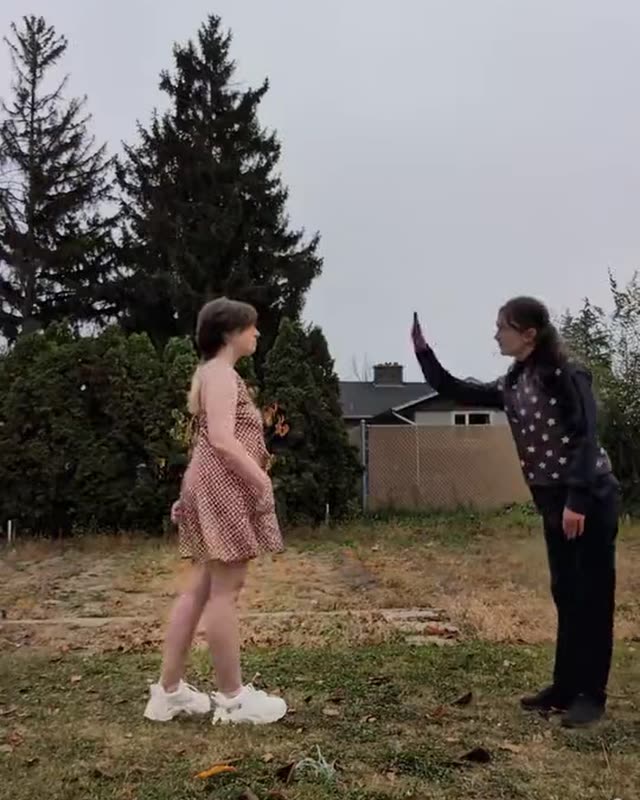 01
THE FACE OFF
A backyard lawn with fallen leaves, tall evergreens and a gray sky. Two dancers stand a few steps apart and face each other.
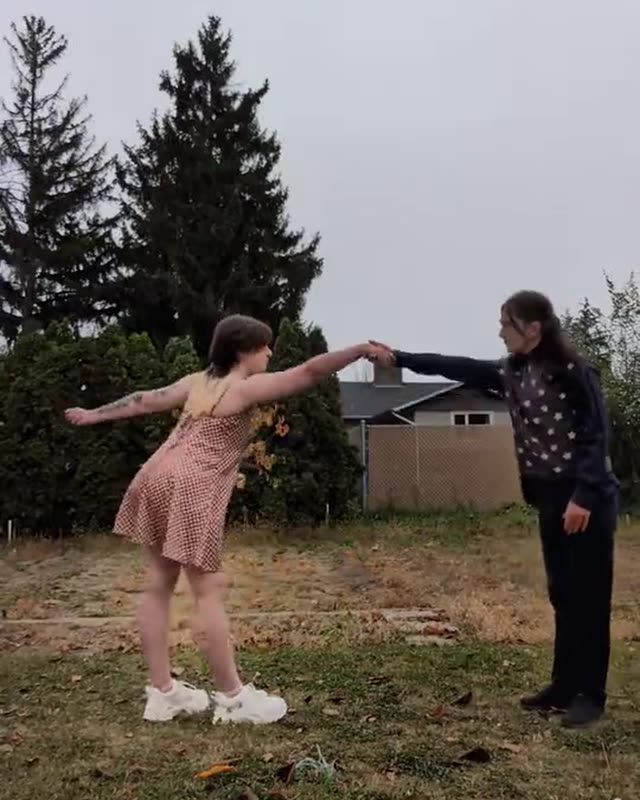 02
THE STAR LEAN
They step in, take one hand and throw the other arm out wide like a star, leaning away from each other on the lean.
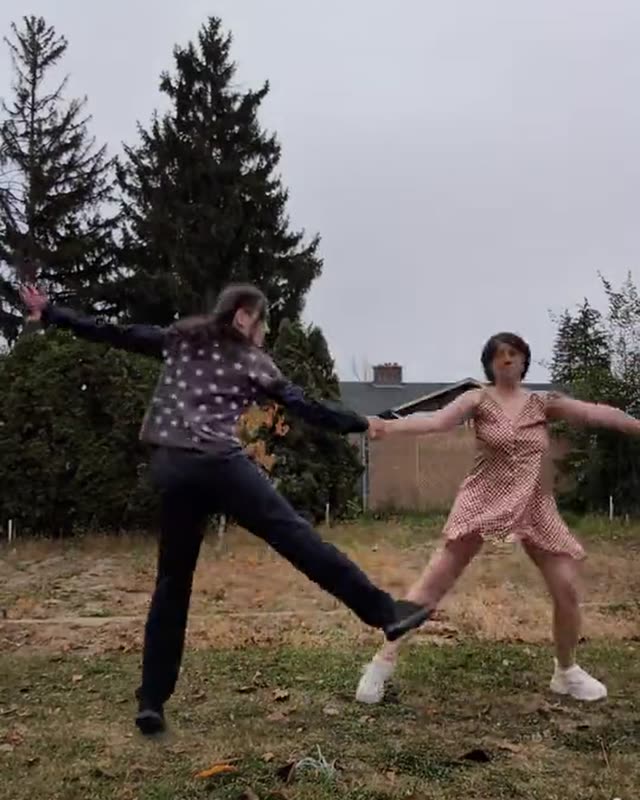 03
THE SPIN
Hand in hand, they swing in close, pass each other and start to spin, kicking a leg out and swapping places as they turn.
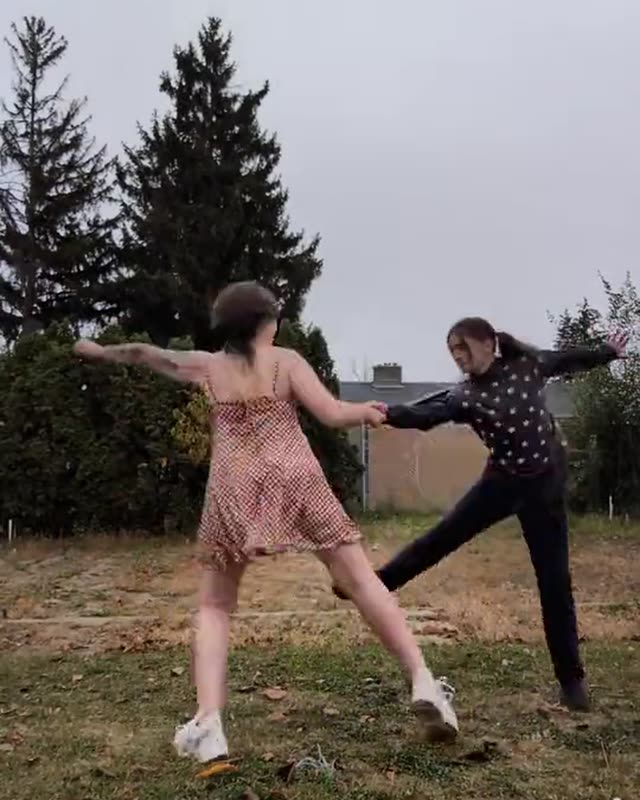 04
THE WHIRL
The spin keeps speeding up, hair and dress flying, until the clip ends mid-turn. That runaway last spin is the part everyone replays.
YOUR DANCER IN THE SPIN
The Last Dance AI video generator gives you a 11-second vertical video with the template's own sound: the same backyard, the same camera, the same whirl you previewed, with your photo dancing where an original dancer stood. Pick the solo template, choose the left or the right spot, and your photo replaces that dancer while the other stays as filmed. Pick the duo template and two photos take both spots, spinning hand in hand. A pet dances upright on its hind legs and holds your hand with its front paws. No cartoon characters appear in these videos: the stage animations belong to the artists who drew them, and this template is the real backyard duet. The cuts below come straight from the template, so you can read the spin frame by frame. Every run is an independent take, so a reroll starts from scratch instead of fixing the last one.
TEMPLATE, PHOTOS, VIDEO
- BACKYARD SOLO
- BACKYARD DUO
RATIO9:16RESOLUTION720PDURATION11SSOUNDORIGINALPICK YOUR SPOT
The solo template takes one photo and your choice of spot: replace the left or the right dancer, and the other stays as filmed. The duo template takes two photos and hands both spots to your crew. Tap the speaker on a card to hear the track, the same sound your video keeps.
✓lead-dancer.jpg
✓right-dancer.jpg
✓I own this photo or have permission to edit it
ADD YOUR PHOTOS
One clear photo per dancer, person or pet, facing the camera with the whole body in view. Photo one dances on the left. Tick the permission box and the price sits on the button before you commit.
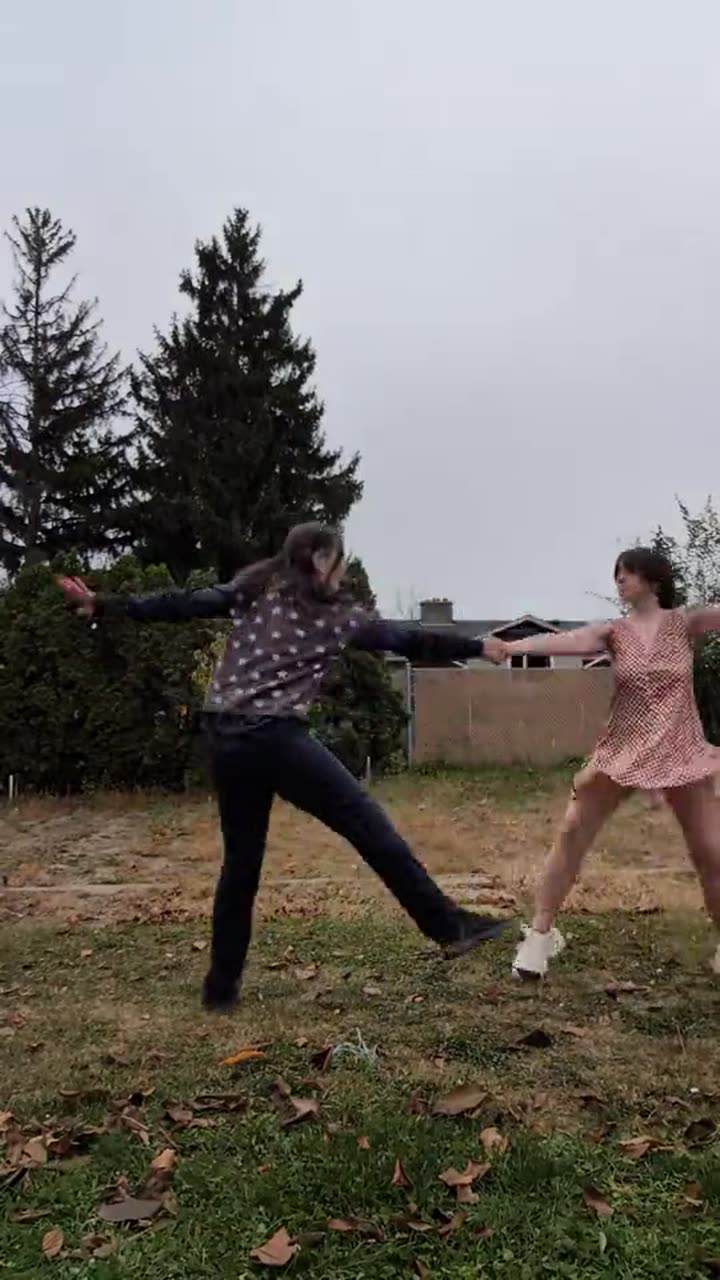
last-dance-backyard-duet.mp4✓ 11S · 720P · READY
GET THE VIDEO
A run usually takes 5 to 15 minutes. The finished vertical video lands in the console and in your library, ready to download and post.
GET A BETTER TAKE
- 01The photo decides the dancer. A sharp, front-facing shot in even light, with the whole body in view, holds up best through the lean and the fast turns, and the original file beats a screenshot.
- 02Pick the template by the joke you want. Solo lets you choose the spot, so you can dance next to the dancer you would rather keep on film. Duo is for two people or two pets taking both spots, and photo one always lands on the left.
- 03Standing photos beat sitting ones. Your dancer appears at full height next to the other dancer, so a photo where the person stands straight gives the model the proportions it needs.
- 04Pets need a clear fur shot. The model rebuilds your animal from the photo, so a sharp picture with the face, ears and markings in view keeps the animal itself through the spin. If a face drifts on the fast turns, reroll the same photo: every run is an independent take.
- 05Post the whole clip and use the trend words. The joke rides the runaway final spin, so leave it uncut, keep the platform's AI label on, and put the last dance trend in your caption. A tag like #thelastdance helps people browsing the trend find yours.
EVERY TOOL, ONE BALANCE
The other tools run on the same credits and the same uploads. Upscale a frame you like, cut the background from a pet photo, or take a bigger idea to the Video Maker.
THE TOOL AND THE AGENT
The Last Dance AI is PixQuill's console for the spinning duet trend: one or two photos in, the trend's video out, with no editing app and no template timeline. The template restages a public video format. PixQuill is not affiliated with the people who filmed or posted the clips that started the trend, and nothing here uses their names.
Under the hood it is one fixed pipeline: Kling 4.0 remakes the template's own video around your photos as a 11-second vertical cut at 720p, with the template's soundtrack kept as is. The sound you hear in the preview is the sound in the file. The solo template costs a flat 700 credits and the duo template 1500 credits, shown on the button before you commit. The dancers follow your photos as closely as the model can manage, and a perfect match is not guaranteed.
The tool shares everything with the rest of PixQuill: one credit balance across the image consoles and the Video Maker, uploads you can reuse, and one library that keeps every finished file. There is nothing to install, because the video renders on our servers. A run usually takes 5 to 15 minutes, and a run that fails on our side refunds its credits automatically.
STRAIGHT ANSWERS
▸ What is the last dance trend?
The Last Dance is a TikTok trend built on a spinning duet: two dancers take one hand, throw the other arm out wide like a star and whirl around each other, faster and faster, as if it were their last dance. It started as a hand-drawn animation meme, then couples, friends and cosplayers began filming the spin in real backyards and hallways. The song behind it is an older electronic track that fans nicknamed the last dance, and the nickname is the name the trend carries now.
▸ Is this the Michael Jordan documentary?
No. The Last Dance is also the title of a 2020 basketball documentary, and that show has nothing to do with this trend. The last dance trend people search now is the hand-in-hand spinning duet, and that is the only thing this tool makes.
▸ Is the last dance trend animated?
The format started that way. Artists drew two characters dancing a final duet on a shared stage background, and those drawings carried the format across fandoms. The trend then moved to real footage, and that is the side this tool works on: the template is a real backyard duet, and your photos become the two dancers in it.
▸ Is this the original backyard video?
No. The template restages the public duet format around your photos: your photos take the dancer spots, and the parts you do not replace stay as filmed. That means the other dancer in solo, and the whole routine, camera and sound in every video. PixQuill is not affiliated with or endorsed by the people who filmed or posted the clips that started the trend.
▸ How do I make a Last Dance AI video?
Pick the solo or the duo template, upload one or two clear photos, tick the permission box and hit generate. The Last Dance AI generator keeps the backyard, the camera, the spin, the sound and the ending, and puts your dancer where an original dancer stood. You do not write a prompt or open an editing app.
▸ Can I use my dog, my cat or a photo of myself?
Yes. Both templates accept people and pets. A person appears at full adult height next to the other dancer, and a pet stands upright on its hind legs and holds hands with its front paws, the way the pet versions of this trend dance. A sharp, front-facing photo with the whole body in view works best; a group shot confuses the model, so crop to one subject per photo.
▸ What is the difference between solo and duo?
Solo takes one photo and one choice: pick the left or the right dancer, and your photo replaces that one while the other stays as filmed. Duo takes two photos and replaces both dancers, which is how the couples and friend duos posting their own runs do it. Photo one always dances on the left in duo, and you can swap the two photos before you generate.
▸ Will cartoon characters appear in my video?
No. The stage-background animations are drawn by the artists who made them, and this tool does not put them in your video. The template restages the real backyard duet: in solo, one spot is yours and the other stays as filmed; in duo, your two photos take both spots.
▸ Which photo works best?
One person or one pet per photo, standing, facing the camera, in even light. The spin shows the whole body, so the clothes in your photo are the clothes you dance in. No sunglasses hiding the face, and no beauty filters. The template brings the backyard, so your photo's background does not matter.
▸ Does the video keep the original sound?
Yes. The soundtrack is the template's own track, kept as is in your file, so the timing you previewed is the timing you get. The model changes the picture and leaves the sound alone. The trend sound people search for goes by the last dance and by botsu 8, its older track name; if your post needs that exact sound, pick it in the app when you publish. Sounds on those platforms belong to their owners.
▸ How much does the Last Dance AI generator cost?
Solo videos cost 700 credits and duo videos 1500 credits, flat. The price shows on the button before you generate. Packs and memberships are on the pricing page.
▸ Is the Last Dance AI generator free?
You start free: new accounts get free credits that work across the image tools right away. Each video costs a flat 700 or 1500 credits depending on the template, and the price sits on the button before you commit. If a run fails on our side, the credits refund automatically, in full. Packs and memberships are on the pricing page.
▸ How long does a run take, and what if it fails?
Usually 5 to 15 minutes. You can close the tab; the run keeps going on our servers and lands in your library under Works. If a run fails on our side, the credits refund automatically, in full.
▸ Will my dancer look exactly like my photo?
It follows the photo as closely as the model can manage, and likeness holds best with a sharp, well-lit, front-facing shot that shows the whole body. The fast part of the spin is the hardest stretch, so if a face drifts or a limb bends the wrong way, reroll the same photo. Each reroll is priced like a new run.
▸ How do you do the last dance dance in real life?
Stand a few steps apart and face each other. Take one hand, throw the other arm out wide like a star and lean apart, then swing in close and start spinning hand in hand. Kick a leg out as you turn, swap places, let go for a moment and catch hands again, faster and faster until one of you stumbles. Or skip the practice and let the photos dance.
▸ Can I post it to TikTok, Reels or Shorts?
Yes. Every video is a vertical 9:16 MP4 with sound, the shape TikTok, Instagram Reels and YouTube Shorts expect. Download it from the console or your library and upload it like any other clip. Each of those apps has a setting to label AI-made content, so switch it on when you post.
▸ Can I use the videos commercially?
Videos you generate are yours to use within our terms of service. Rights in the photos you upload stay where they were, so only use photos you own or have permission to edit. The sound in the soundtrack belongs to its rights holders, so check the music rules of wherever you publish before you put the clip in an ad. Details live on the Copyright page.
▸ What happens to the photos I upload?
PixQuill uses them to make your video. The photos go to the AI provider for that run, then stay in your own library next to the finished video. PixQuill does not train AI models on your uploads without your explicit consent. The Privacy Policy has the details.
CLAIM YOUR LAST DANCE
Drop in one photo and the console runs the whole 11-second spin, sound and all. New accounts start with free credits, and runs that fail on our side refund automatically.