✦ OBJECT REMOVER
THE AI OBJECT REMOVER THAT REBUILDS THE SCENE
Brush over the tourist, the trash can, the ex's shadow. The AI object remover rebuilds whatever was behind it.
SOURCE PHOTO
Drop a photo here, or click to browse
PNG / JPG, up to 5 MB
MODEL
Your result lands here
Pick a model and resolution, then hit generate.
- OVER ANYTHING THAT SHOULD GO
- BRUSH
- THE SCENE BEHIND THE MARK
- REBUILD
- NO TRACE LEFT IN THE REBUILT SCENE
- VANISH
- UP TO 4K, READY FOR PRINT AND POST
- SHIP
GONE WITHOUT A TRACE
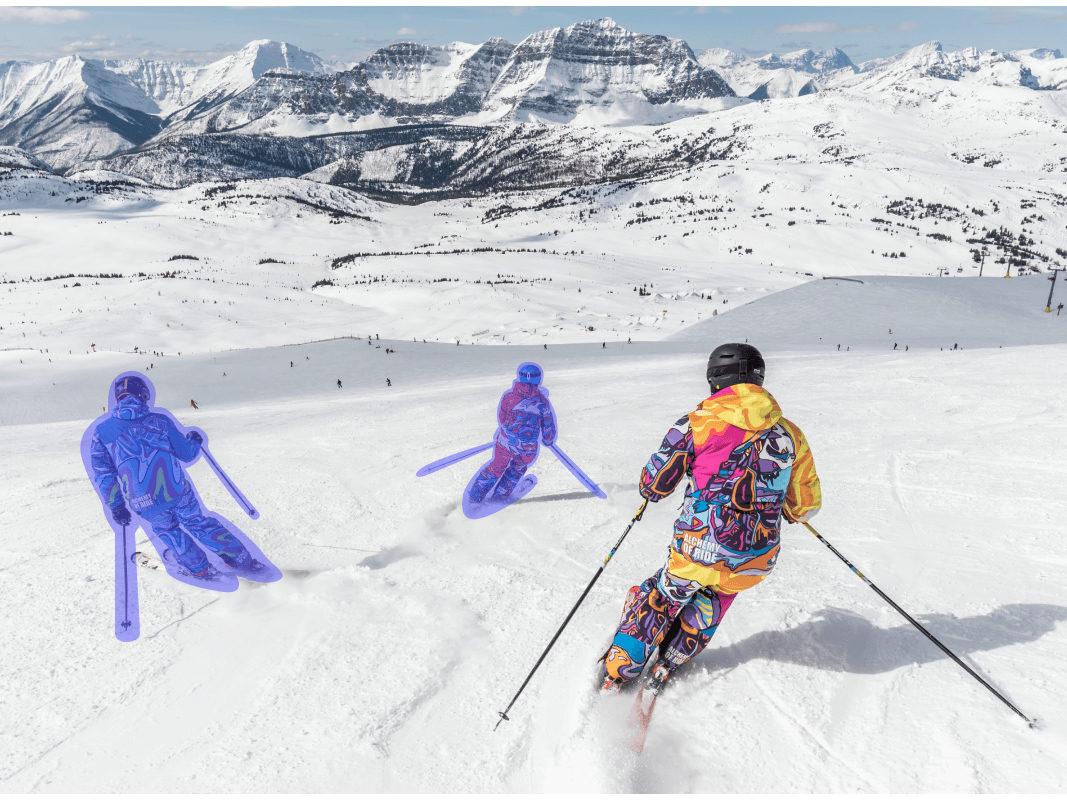
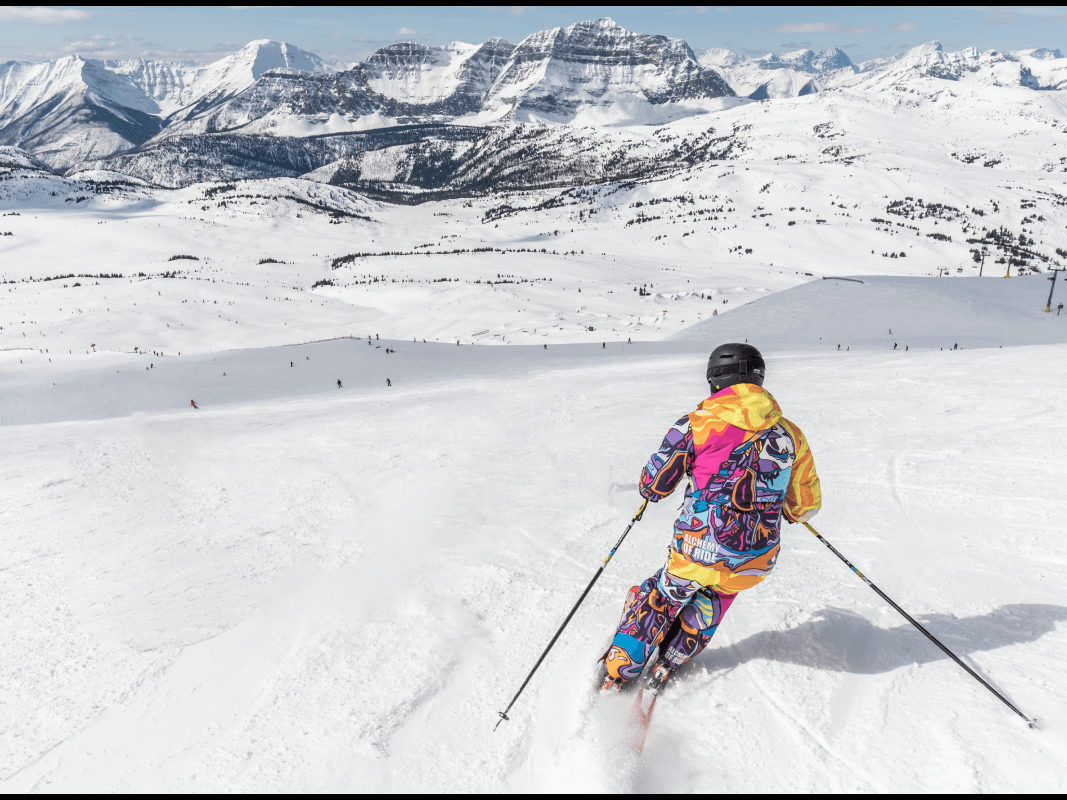
Pink marks show what we told the model to remove. One run later, it is gone.


The shot was right and the rental gear was not. One pass takes the umbrella and the chair, and the sand fills back in.
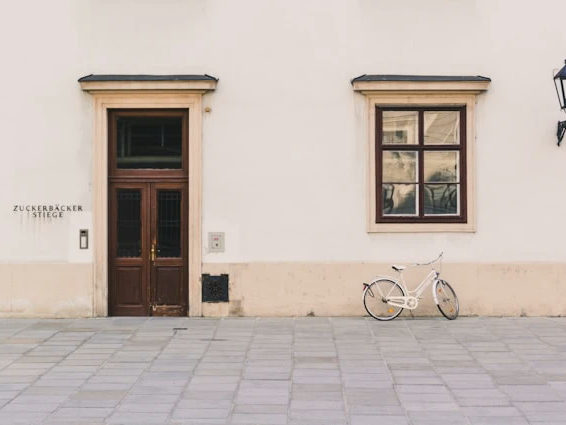
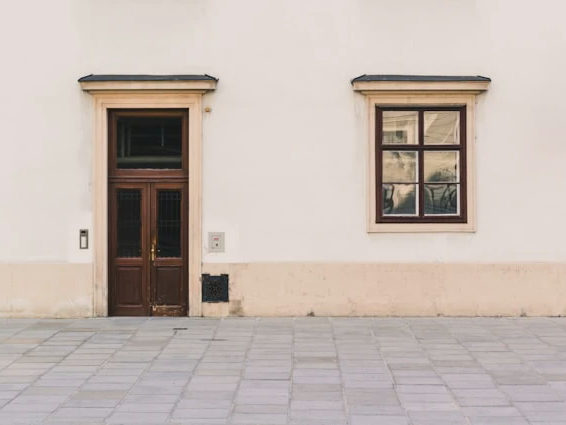
Exteriors collect bikes, fixtures and painted text. The brick and the mortar lines rebuild clean behind them.


A portrait is about one person. The family and the playing kid come out, and the park stays put.
IF IT'S IN THE FRAME, IT CAN GO
PEOPLE AND TOURISTS
Photobombers, passersby, the ex in the group shot. Brush the person and the shadow, and the scene behind them fills back in.
TEXT AND DATE STAMPS
Captions, slogans, the orange date a camera burned into an old scan. The surface under the letters gets rebuilt, brick or skin or sky.
WATERMARKS AND LOGOS
Corner stamps and full-screen overlays come out cleanly. Only do this on images you own or have permission to use; rights stay where they were.
WIRES AND POWER LINES
Cables, fences, railings, anything long and thin. Go fullscreen with a small brush, work in segments, and the skyline closes up.
BLEMISHES AND STAINS
Pimples, wrinkles, scratches and spots on prints. Small marks, quick runs, and the texture comes back instead of a smear.
CLUTTER AND TRASH
Trash cans, hoses, construction debris, the neighbor's car. The stuff that kills listing and product photos, gone before you post.
THE CLONE STAMP GUESSES. THE MODEL REBUILDS.
Both cover the object. Only one knows what was behind it.
THE CLONE STAMP (MANUAL)
- Samples nearby pixels and hopes the pattern holds
- Repeats bricks and leaves a visible echo
- Takes minutes per object and years to get good at
- Smears skies and gradients into banding
THE BRUSH (PIXQUILL)
- Infers the hidden scene from the whole photo's context
- Re-renders texture so the patch reads as untouched
- One stroke per object, done in about a minute
- Keeps skies, walls and skin tones smooth
EVERY TOOL, ONE BALANCE
Removal is usually one step of the job. The rest of the studio shares your uploads and credits.
MARK IT, LOSE IT
DROP A PHOTO HERE, OR CLICK TO BROWSE
PNG / JPG · UP TO 5 MB
UPLOAD THE PHOTO
Any JPG or PNG up to 5 MB. The photo opens straight into the marking canvas.
BRUSH OVER WHAT SHOULD GO
BRUSH THE TARGET
Brush over the object; the eraser trims overreach. Cover it fully. Edges left out stay behind. No brush handy? Run it without marks and the AI clears the obvious clutter.
ski-run-cleaned-4k.jpg✓ 4K · JPG · READY
REMOVE AND COMPARE
Runs take 30 to 60 seconds. The result stacks on the original, so you can judge the rebuilt spot against how it looked before.
REMOVAL THAT HOLDS UP
BACKGROUND REBUILT
The model infers what's behind the mark (grass, bricks, sea) instead of smearing pixels outward. The rest of the photo stays untouched, pixel for pixel.
FOUR MARK COLORS
Pink, green, blue or yellow marks, whichever reads best against your photo. The color never touches the result.
UNDO EVERY STROKE
Ten steps of undo, an eraser for overreach, and a confirmed clear when you want a clean slate.
FULLSCREEN MARKING
Expand the canvas for detail work on hairlines, wires and fence rails.
2K AND 4K OUTPUT
The rebuilt photo renders at up to 4K on the models that reach it, ready for print or feed.
HONEST BILLING
The price shows before the run, and failures on our side refund automatically.
CLEANER REMOVALS
- 01Cover the object's shadow too. A removed person with a remaining shadow reads wrong.
- 02A slightly generous mark beats a tight one; the model fills the extra pixels for free.
- 03Thin wires and hair: switch to fullscreen and a small brush.
- 04Long thin things like cables and railings come out cleaner in segments than in one heroic stroke.
- 05One object per run when the scene is busy. Stacked runs stay clean.
- 06Weird texture where the object was? Don't undo. Widen the mark a little and run again; a second pass almost always settles it.
WHY BRUSHING BEATS CLONING
The clone stamp asks you to do the model's job by hand: sample, paint, blend, repeat. The Object Remover inverts it. You only say where the problem is, and the model handles what should be there instead. One stroke over a power line replaces ten minutes of stamp work.
The engines behind the console cover different jobs. Nano Banana 2.1 is the default: reaches 4K and stays steady on detailed rebuilds. Twenty-four more models share the picker, from 2-credit Flux 3 Klein for cheap drafts to flagships that earn their price on hero shots. The console names the engine and the price before every run, so the choice is never a guess.
The same engines power the studio's other removers. If the whole background is the problem, cut the subject out instead; if the fix needs words rather than a brush, the AI Image Editor takes points and boxes.
STRAIGHT ANSWERS
▸ How do I remove an object from a photo?
Upload, brush over the object, hit generate. The marked area is removed and the background behind it is rebuilt by the model. The run usually takes 30 to 60 seconds.
▸ Can I remove objects without brushing over them?
Yes. Generate without any marks and the model removes the distracting elements on its own: background people, wires, trash, small text. Your main subject stays. For one specific object, brushing is still the precise way.
▸ Can I remove people from photos?
Yes. Brush over the person and their shadow. Crowded scenes work best one person per run.
▸ Will the removal leave a blurry patch or lower the quality?
No smearing involved. The model re-renders the marked area from context, and the rest of the photo stays pixel for pixel. Output goes up to 4K, so the result holds up in print.
▸ What if the AI leaves a weird texture or artifact?
Don't undo. Widen the mark a touch and run again; a second pass almost always settles the area. Busy scenes also respond well to one object per run.
▸ Can I remove a watermark?
The tool can, but only do it on images you own or have a license for. Watermarks usually signal restricted rights, and removing one doesn't transfer any. Details live on the Copyright page.
▸ Does the mark color matter?
Only for visibility while marking. The color tells the model which marks are targets; the result contains no trace of it.
▸ What resolution do I get back?
That depends on the model. Nano Banana 2.1, Seedream 5.0 Lite and Seedream 4.5 reach 4K; most of the picker tops out at 2K. Format options follow the model: JPG or PNG where the model offers the choice.
▸ Is the Object Remover free to try?
Yes. New accounts start with free credits and the daily check-in adds more, so you can clean real photos before spending anything. The console shows the exact price of every run upfront.
▸ Does it work on my phone?
Yes. Nothing to install: upload from your phone, the removal runs on our servers, and the result downloads back.
▸ What if the removal fails?
If a run fails on our side, the credits go back automatically. You can also adjust the mark and re-run. The photo stays loaded.
▸ What if I need the whole background gone instead?
Use the Background Remover to keep the subject and drop everything else, or the AI Image Editor when the fix needs words as well as marks.
THE PHOTO, MINUS THE PROBLEM
Upload, brush over the thing that should not be in the frame, judge the rebuild against the original. New accounts start with free credits.