✦ AI EFFECTS
DJ COOKING AI VIDEO GENERATOR
Add one photo and get a 19 second DJ Cooking clip at the kitchen decks, pads lit and wok on fire. No prompt to write.
ONE PHOTONO PROMPT TO WRITEA 19S 9:16 VIDEOUSUALLY 5 TO 15 MINUTES
TEMPLATE
Your video carries this template's own sound.
YOUR PHOTO
One clear photo, chest up, face front. That face and hair are what the person on the deck keeps for all 19 seconds. Your own clothes do not carry in: the leopard shirt stays the template's.
ASPECT RATIO
Your video lands here
One photo in, tick the box, then generate.
- WHAT YOU ADD
- One photo, face chest up
- WHAT YOU PICK
- One cut: Kitchen Deck Fireball
- WHAT COMES BACK
- A 19s 9:16 video, sound kept
- WHAT IT COSTS
- 700 credits
- HOW LONG IT TAKES
- Usually 5 to 15 minutes
- IF IT FAILS
- Credits come back, on our side
UP-FRONT PRICING
Recommended packs start at $9.99 and stay valid while your account is active. Memberships start at $4.99 a month. One balance covers every image and video tool. The console shows the fixed price before you render.
Standard Pack
$9.99
700CREDITS
≈ 350images
≈ 30SOTA images
≈ 88svideo
≈ 43sSOTA video
A full issue's worth of art, plus videos for the launch.
ONE PAYMENT · NEVER EXPIRE
Pro Pack
$19.99
1,600CREDITS
≈ 800images
≈ 69SOTA images
≈ 208svideo
≈ 100sSOTA video
Batch season. Whole chapters and the videos that sell them.
ONE PAYMENT · NEVER EXPIRE
STANDARD MEMBERSHIP
$4.99/ month
1,000CREDITS EVERY MONTH
For weekly creators and side projects.
≈ 500images
≈ 43SOTA images
≈ 128svideo
≈ 62sSOTA video
NO LOCK-IN · CANCEL ANY TIME
PRO MEMBERSHIP
$19.99/ month
5,000CREDITS EVERY MONTH
For daily image and video production.
≈ 2,500images
≈ 217SOTA images
≈ 664svideo
≈ 312sSOTA video
NO LOCK-IN · CANCEL ANY TIME
Membership credits are available while the membership is active. Unused membership credits expire when the membership ends.
Image estimates use Flux 3 Klein at 1K, the lowest-priced run on the site. Video estimates use 8-second Veo 3.1 Lite videos at 720p, or Wan 3.0 at 480p for the SOTA row. The console shows the exact cost before every run.
DJ Cooking
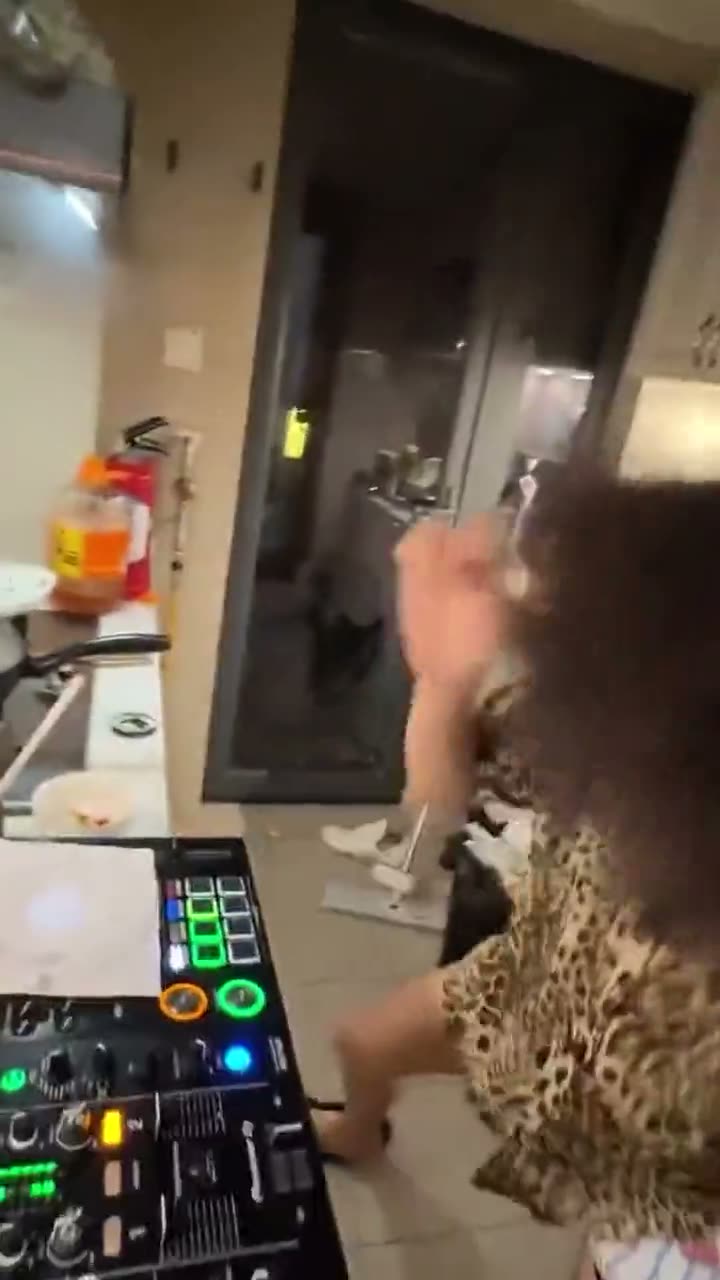
Someone lays a DJ controller across the kitchen counter, rests the plate of food on it, and mixes while the wok heats up. The pads light, the beat builds, then the pan lets go: a fireball off the stove and the person thrown back from it, still on their feet in front of the open doorway, mouth open. The kitchen, the deck, the outfit and the sound all stay where they were. Only who is on the deck changes.
 01
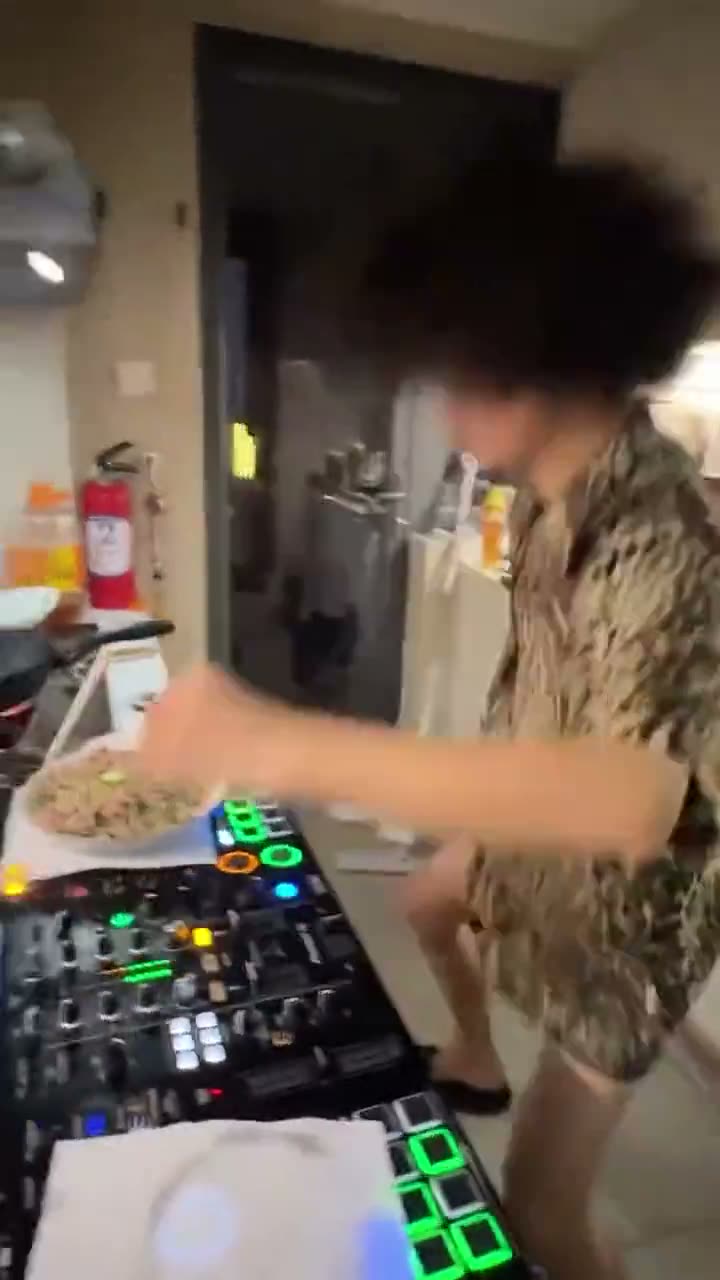
An arm across the counter
The clip opens mid-move. One arm reaches over the deck, hand hovering above the pads next to the plate of food, the kitchen lit warm behind.
 02
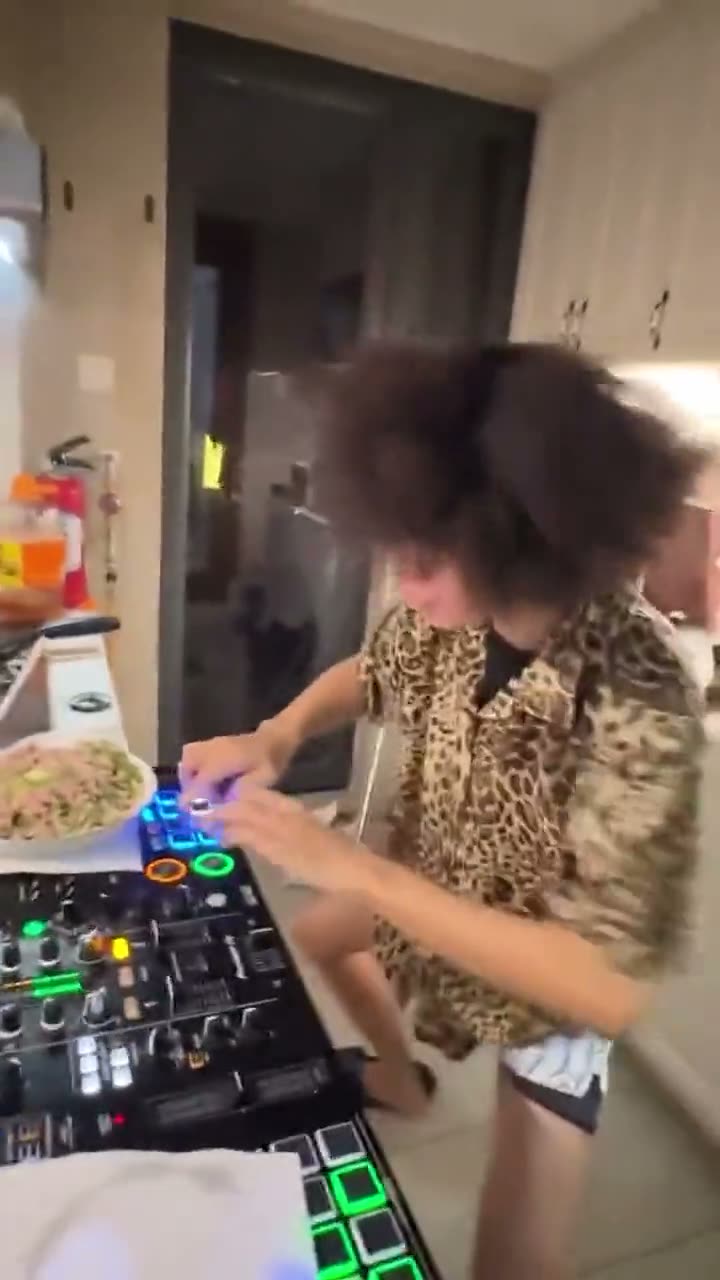
Both hands on the pads
Fingers come down on the glowing pads and punch them one after another while the body keeps bouncing to the beat.
 03
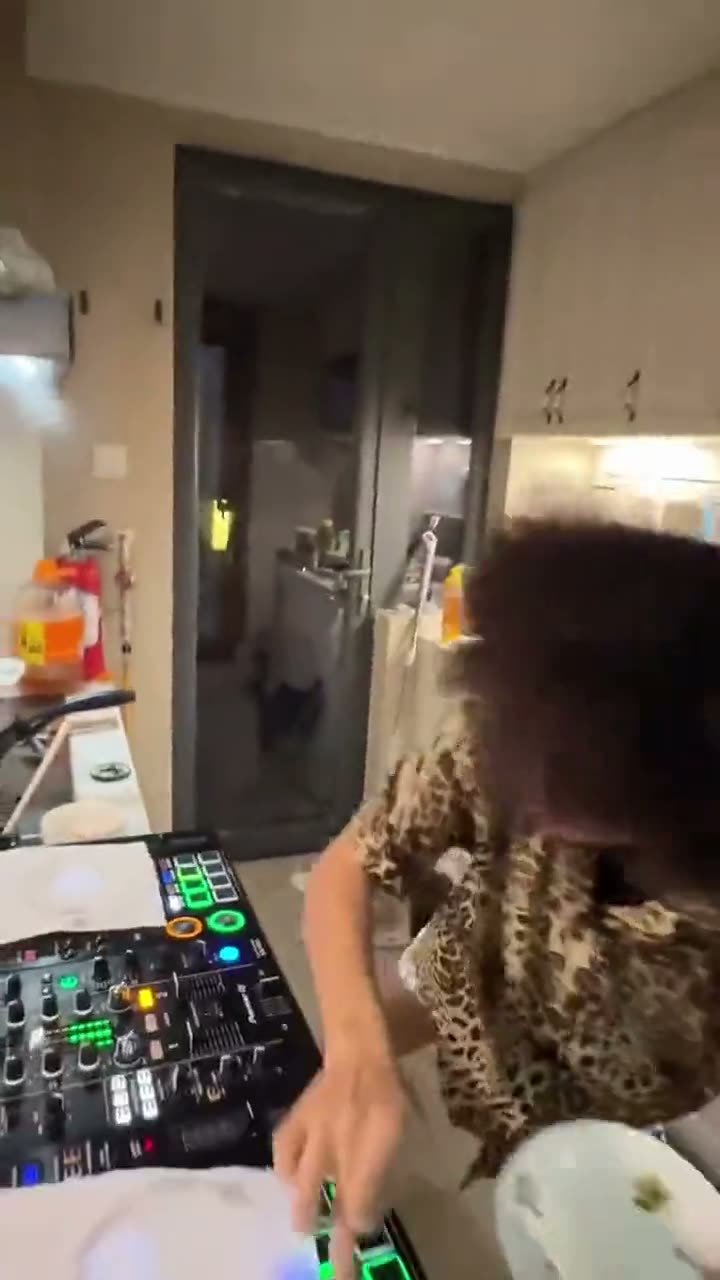
Leaning in, one hand on the wok
They bend further over the controller, still working the pads, the other hand reaching out toward the wok on the burner.
 04
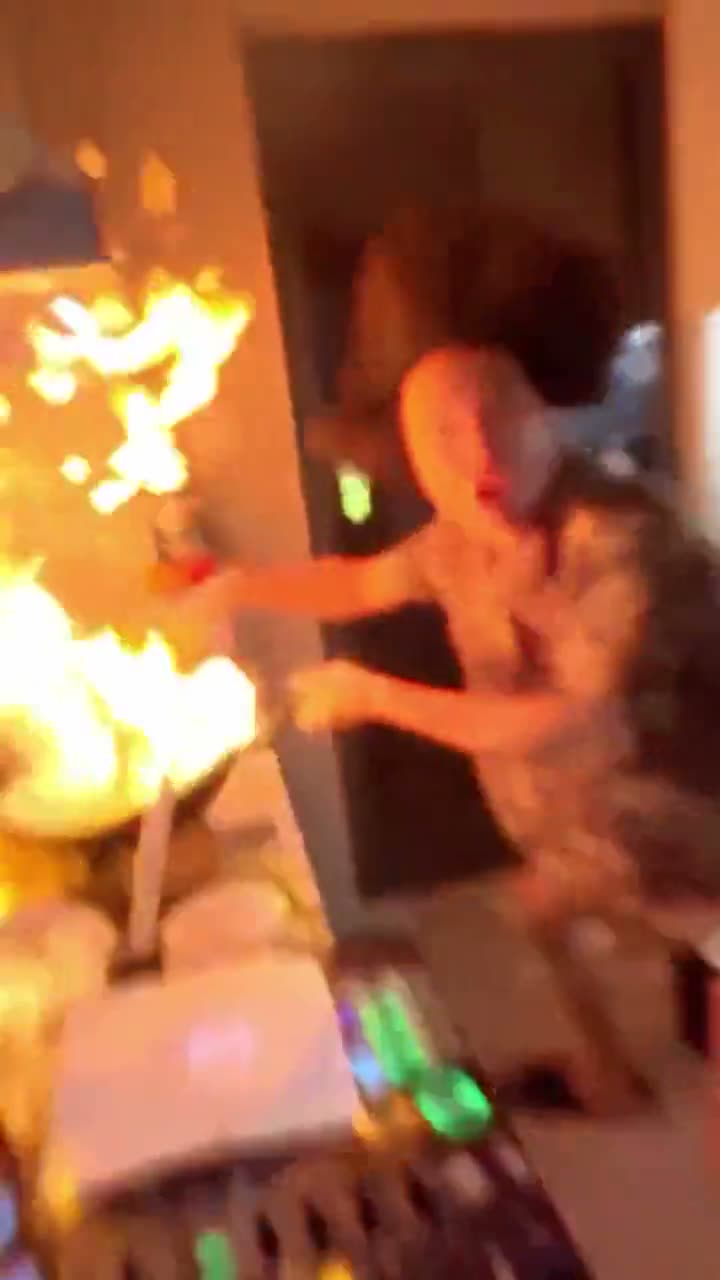
The flare
At about 15 seconds the wok throws a fireball. Orange light fills the frame, the person jumps back from the counter with arms up and stays standing in front of the doorway, and it holds to the last second.
One cut, 19 seconds
Every clip below comes straight from the template, so the kitchen, the framing and the timing you see are what comes back. Add one chest-up photo and your face goes onto the person at the deck.
Three steps, no prompt
- KITCHEN DECK FIREBALL · 19S
RATIO9:16QUALITY480PLENGTH19SSOUNDKEPTPick the cut
Kitchen Deck Fireball is the cut on this page: 19 seconds, vertical 9:16, one photo slot. The deck, the kitchen, the leopard shirt and the flare come with it.
✓your-face.jpg
✓I own this photo or have permission to edit it
Add your photo
Drag a photo in or pick one from your library. Chest up with the face clear works best: that photo is the only source for the face and the hair.
dj-cooking.mp4✓ 19S · 9:16 · SOUND KEPT
Render it
Tick the permission box, check the price and hit generate. The clip comes back at 19 seconds in 9:16 carrying the deck audio from the template, usually inside 15 minutes.
What makes a clean swap
- 01Chest up, face front. The swap only reads if the eyes, nose and mouth are clear, so a plain photo from the shoulders up beats a full-body shot from across the room.
- 02Bring the hair you want on screen. The big fluffy silhouette in the template takes its hair from your photo, so take the photo with your hair the way you want it seen.
- 03Your clothes do not carry over. The leopard shirt belongs to the template, so a photo taken in a suit or at the beach still comes out wearing that shirt.
- 04One face per photo. In a group shot the model takes the person nearest the camera, so crop to the face you want first.
- 05Good light beats high resolution. A sharp daylight photo swaps steadier than a dark, blurry one, and only use photos of people who agreed.
EVERY TOOL, ONE BALANCE
Every page here is one fixed template and the same three moves: photo in, generate on, clip back.
You on the deck, nothing else moves
DJ Cooking is a fixed template effect. The clip already exists: the dark cabinets and the steel fridge, the red extinguisher on the wall, the plate of food at the end of the counter, the controller with its lit pads, the wok on the burner, the flare and the sound running under all of it. Our job is to replace who is on the deck.
The model takes your photo as the only source for the face and the hair and keeps everything else where it was. The outfit stays the template's leopard shirt, the camera stays handheld in the same spot, the beats land at the same seconds and the clip stays 19 seconds in 9:16. Nothing is added and no text is drawn on screen.
The fire is not something we generate for you. It is the flare already in the reference clip, reproduced shot for shot, so the fireball near the 15 second mark looks the same from run to run and no new fire shows up anywhere else in the kitchen. It stays on the screen, which means it is still not a good idea to try the wok trick at home.
There is nothing to install. Upload the photo and the render runs on our servers, so the job keeps going even if you close the tab. The finished clip lands in your account and stays downloadable. If a render fails on our side, the credits go back to your balance.
This is a fan-made effect. It recreates a trend clip that circulates on social feeds, and it is not tied to any artist, brand, studio or platform.
Before you render
▸ Do I have to write a prompt?
No. The prompt is written for the template and locked on our side. You add a photo and press generate.
▸ What is the DJ Cooking trend?
A kitchen counter turned into a booth. Someone lays a DJ controller across the counter, parks a plate of food on it and works the pads while a wok heats up on the stove, until the pan throws a fireball and knocks them backward. The clips are short, filmed at home, and this one runs 19 seconds start to finish.
▸ Does the video have a watermark?
No watermark, no caption and no added logo. The model is told to keep the frame clean and to leave the deck and the walls as they are.
▸ How many photos do I need?
One, chest up with the face clear. That photo is the only source for the face and the hair in the clip.
▸ How long is the result?
Nineteen seconds, vertical 9:16, with the template's own sound kept. The length matches the template exactly, so the flare still lands at the same second.
▸ What does it cost?
One run costs 700 credits, and the console prices it for you before the render starts. New accounts come with free credits, and the packs sit in pricing.
▸ How long does it take?
Give it 5 to 15 minutes. Leaving the page is fine: the render finishes on our servers and the file turns up in your account history.
▸ Is the fire real, or is my kitchen about to burn?
Your kitchen never enters the video. The flame is part of the template clip, and the model reproduces that existing shot instead of adding new fire. It stays on the screen, so it is still not a good idea to try the wok trick at home.
▸ Can I wear my own clothes in it?
No. The leopard shirt is part of the template and your photo supplies the face and the hair. That is what keeps the cut recognizable as the trend.
▸ What if the face on the deck looks wrong?
Generate again with the same photo. Every pass comes out slightly different, and if the render fails on our side the credits return to your balance automatically.
▸ Can I post it commercially?
See the terms and privacy notice for what you can do with renders and what happens to the photos you upload.
▸ Is this an official DJ Cooking tool?
No. It is a fan-made template that recreates a trend look, with no affiliation to any artist, brand or platform.
Put yourself on the deck
One photo, 19 seconds of you working the pads before the wok goes up. Free credits on signup, and the price is on screen before you render.